Invitation for T-SQL Tuesday #20 – T-SQL Best Practices

image

What is T-SQL Tuesday?

T-SQL Tuesday is the brain-child of MVP Adam Machanic (blog|twitter). It happens once a month on the 2nd Tuesday and is hosted by a different person in the SQL community each time. The idea is to get the SQL Community blogging on a common topic on a single day of the month after which a round-up of all the participating posts are done by the hosting blog owner to give the SQL community a one-stop shop of some great articles on a single topic.

What is the topic for July?

The topic for July is “T-SQL Best Practices”. If you work with SQL Server, then undoubtedly you would have had to write T-SQL queries atleast once or would have had to debug the seemingly useful piece of T-SQL code written by your developers to find out where the performance bottleneck or problem was. Your post for this month’s revolving blog party could be along one of the areas:

a. A set of T-SQL best practices that you follow in your shop that or you believe that should be followed always. It could be as specific as for writing only linked server queries or writing queries for SSIS packages etc.
b. An issue that you resolved because certain T-SQL best practices were not followed.
c. A workaround that you used (like query hints) to resolve an issue where T-SQL best practices couldn’t be implemented due to involvement of a third party solution.

Why did I choose this topic?

Over the years of troubleshooting SQL performance related issues, I have found on multiple occasions that the T-SQL query in question was performing badly because certain best practices for writing that piece of code were not followed and the one responsible for the development had not foreseen that such an oversight could become a bottleneck when the data or the number of users increased. So, I thought it would be a good idea to get the SQL Community’s thoughts around best practices in this area. Sometimes, the most obvious things are the easiest to overlook!

What are the Rules?

T-SQL Tuesday has some basic rules which are pretty easy to follow.

1. Your post must be published between 00:00 GMT Tuesday July 12, 2011, and 00:00 GMT Wednesday July 13, 2011.
2. Your post must contain the T-SQL Tuesday logo from above and the image should link back to this blog post.
3. Trackbacks should work, but if you don’t see one please link to your post in the comments section below so everyone can view your blog post.

Good-to-have

  • Include a reference to T-SQL Tuesday in the title of your post
  • Tweet about your post using the hash tag #TSQL2sDay
  • Being creative always fetches brownie points and gets a smile from the reader!

So now it’s time for:

SELECT [content] FROM [dbo].[tblbrain] WHERE [content_type] = ‘T-SQL’

Before I wrap-up this post, a big thanks to Adam for letting me host T-SQL Tuesday for this month!

T-SQL Tuesday #18: CTEs, XML and Process Monitor

T-SQL TuesdayThis month’s recurring SQL blog party a.k.a. T-SQL Tuesday started by Adam Machanic (blog | @AdamMachanic) is being hosted by Bob Pusateri (blog | @SQLBob). This month’s topic is about Common Table Expressions which was introduced for the first time in SQL Server 2005. CTEs can be thought of as a derived table which can be self-referenced within a query. With the advent of CTEs, a lot of T-SQL developers made full use of this feature. Personally, I have used CTEs for various data collection and parsing scripts that I use for daily for my day-to-day work. I am a big fan of CTEs and have introduced their usage in one of the blocking reports for SQL Nexus. As with any coding construct, the use of CTEs has it’s PROs and CONs but in this post, I shall not go down the path as there are a lot of depends on whether a particular scenario is fit for the use of CTE of a temporary table. That decision has to be made based on testing against the benchmarks that you have or response-time SLAs that have defined for your application.

Since my primary expertise lies with SQL Server, I examine every opportunity of data analysis with the intention of importing the data into a SQL Server database table and then writing an automation routine over it to help me save the repititive iterations when I am analyzing the same data or need to perform the same set of steps over and over again. Recently I have shifted over to Powershell due to affinity for scripting but that will be a story for some other blog post. CSS uses Process Monitor, a vastly popular tool from Sysinternals, to troubleshoot various problems that we encounter while working on SQL Server related issues. Some of our adventures with Process Monitor are mentioned below:

PRB: SQL Backups to a UNC path fail with OS Error 1 (Incorrect Function)
INF: Permissions required for SQL Server Service account to use SSL certificate

During my tenure here with CSS, I too have relied on the Process Monitor to troubleshoot some fairly complex issues. Sometimes the Process Monitor .pml files can be quite large if collected without adding appropriate filters and I am just interested in a particular process(es). By importing the .PML file into a database, I can not only query the imported data using T-SQL queries but I can also write quick automations to look for common stack traces that I know have known issues/problems associated with them. Yes with Process Monitor, you can use locally cached symbols to get the call stack of the function call as well. Note that saving a .PML into XML with resolved stack symbols is slow due to the time taken for symbol resolution. The .XML file that I will use as an example was saved using the “Extensible Markup Language (XML)” option with “Include stack traces (will increase file size)” option enabled. I captured a Process Monitor trace while trying to access a directory which was not present on my server.
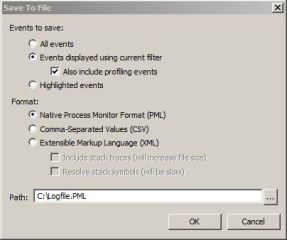
I already have a stored procedure to import the saved .XML file into a database table, then parse that existing data and insert the parsed data into the two tables that I have created to stored the event and stack information.

How does the use of CTEs fit in here?

The .XML file has the following structure for the stack and the frames:

<ProcessIndex>2083</ProcessIndex>
<Time_of_Day>5:52:38.8471548 PM</Time_of_Day>
<Process_Name>Explorer.EXE</Process_Name>
<PID>6588</PID>
<Operation>NotifyChangeDirectory</Operation>
<Path>D:\Tools</Path>
<Result></Result>
<Detail>Filter: FILE_NOTIFY_CHANGE_FILE_NAME, FILE_NOTIFY_CHANGE_ATTRIBUTES, FILE_NOTIFY_CHANGE_LAST_WRITE</Detail>
<stack>
<frame>
<depth>0</depth>
<address>0xfffff880013ab027</address>
<path>C:\Windows\system32\drivers\fltmgr.sys</path>
<location>fltmgr.sys + 0x2027</location>
</frame>

<frame>
<depth>1</depth>
<address>0xfffff880013abbe9</address>
<path>C:\Windows\system32\drivers\fltmgr.sys</path>
<location>fltmgr.sys + 0x2be9</location>
</frame>
….
….
</stack>

Now each operation has a call-stack associated with it which I am interested in importing into my database. But with the existing schema above, I cannot get the information that I require . After exploring the use of multiple ways of parsing the data using temporary variables, temporary tables, recursive CTEs, XML indexes and blah.. blah.. , I found that that quickest way to do this was:

1. Get the event list imported into a temporary table
2. Using the event list generated above, create the call stacks from the <frame> nodes (see code snippet below)

The logic here is that the cteXML used below extracts all frames for a particular event using a counter variable and creates XML data for each of the frames which are parsed by referencing the cteXML in the INSERT INTO…SELECT query.

-- Extract events from the XML file and put them into a staging table

INSERT INTO #tblXMLstaging (event,fname)

SELECT C.query('.') as event,@fname

FROM dbo.tbl_XMLData

CROSS APPLY xmldata.nodes('/procmon/eventlist/event') as T(C)

WHERE fname = @fname

-- Fetch values from staging table, store parsed frames in an XML and parse them to insert data into procmon_stacks table

WITH ctexml as

(

SELECT TOP 15 eventid,C.query('.') as frames,fname

FROM #tblXMLstaging

CROSS APPLY event.nodes('/event/stack/frame') as T(C)

WHERE eventid = @counter

)

INSERT INTO dbo.tblProcMon_Stacks (StackID, FName, FrameDepth, [Address], [Path], Location)

SELECT

eventid as StackID,

fname,

frames.value ('(/frame/depth)[1]', 'int') as FrameDepth,

frames.value ('(/frame/address)[1]', 'varchar(50)') as [address],

frames.value ('(/frame/path)[1]', 'varchar(255)') as [Path],

frames.value ('(/frame/location)[1]', 'varchar(255)') as [location]

FROM ctexml

The output of

If you are curious as to how long it takes to import the data, it took me a little over a minute (84 seconds to be precise) to load a 100MB XML file, parse and shred it! I am sure that there are optimizations possible to this method. The screenshot on the left shows the load times. The system specifications on where the data import is being done is: 

Operating System: Microsoft Windows Server 2008 R2 Enterprise (x64)

Machine: Hewlett-Packard HP Z800 Workstation

Processor: 2 Quad Core [Intel(R) Xeon(R) CPU E5506  @ 2.13GHz, 2128 Mhz, 4 Core(s), 4 Logical Processor(s)]

RAM: 16.0 GB

Hard Disk: Barracuda 7200.12 SATA 3Gb/s 500GB Hard Drive

SQL Server: SQL Server 2008 R2
Now that the data is available in a database table, I can query the information using T-SQL queries. I had attempted to open the directory C:\Foo on my server using Windows Explorer. This information and the callstack can be visible using the following T-SQL queries:

-- Get the event information associated with the directory that I was looking up
select ProcessName, PID, Operation, Path, Result, Detail, StackID from dbo.tblprocmon_events

where fname = 'FileNotFound.xml'

and path like '%C:\Foo%'

order by StackID

-- Get information for the call-stack using the StackID obtained above
select FrameDepth, address, Path, Location

from tblProcmon_stacks

where fname = 'FileNotFound.xml' and StackID = 662

order by FrameDepth

Below is a screenshot showing me that the directory doesn’t exist and the call-stack associated with the function call that failed.
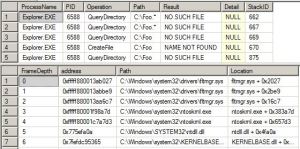
The options are now limitless, you can take this forward by creation for common callstacks in-case you are troubleshooting an application developed by you and have access to the private symbols. Or you could look for common results for certain operations like Operation = QueryDirectory and Result = NO SUCH FILE. My use of CTEs are for the following tasks:

1. Parsing XML data as shown here
2. Extracting useful information from Ring Buffers
3. Tracking available contiguous memory used and available in the SQL Server process address space

The scripts containing the Stored Procedure definitions and table schemas can be downloaded from here.


T-SQL Tuesday#17: It’s all about APPLYcation this time

imageIt’s time for another round of T-SQL Tuesday and this round of the revolving blog party is being hosted by Matt Velic [Blog | Twitter].

APPLY – That is the topic for this month’s T-SQL Tuesday! The APPLY operator was added to the T-SQL repertoire and which has resulted in lesser use of cursors for a large number of diagnostic scripts that CSS uses to collect data while working on SQL Performance issues. In this blog, I shall share a few examples of such queries that we use to collect data while working on SQL Performance cases.

TOP Query Plan Statistics

The following query gives you a list of the SQL batches/procedures with their CPU usage, Query/Batch duration and Physical Reads rank. This query helps identify the TOP CPU/Duration/Read consuming queries by making use of system DMVs. The output below is useful for the following reasons:

1. I get the usecount of the procedure/batch and if this batch is called multiple times and the use count of a Compiled Proc cached object is only 1, then the plan is not being re-used. This now tells me that I need to look at reasons behind inability of plan re-use.

2. I get the total and average resource usage statistics for each of the queries listed in the output.

3. A quick glance at the output gives me an idea of the most expensive queries on the instance w.r.t. reads or/and CPU and/or query duration.


SELECT

LEFT(p.cacheobjtype + ' (' + p.objtype + ')',35) AS cacheobjtype,

p.usecounts,

p.size_in_bytes/1024  AS size_in_kb,

PlanStats.total_worker_time/1000 AS tot_cpu_ms,

PlanStats.total_elapsed_time/1000 AS tot_duration_ms,

PlanStats.total_physical_reads,

PlanStats.total_logical_writes,

PlanStats.total_logical_reads,

PlanStats.CpuRank,

PlanStats.PhysicalReadsRank,

PlanStats.DurationRank,

LEFT(CASE WHEN pa.value = 32767 THEN 'ResourceDb' ELSE ISNULL(DB_NAME(CONVERT(sysname,pa.value)),CONVERT(sysname,pa.value)) END,40) AS dbname,

sql.objectid,

CONVERT(nvarchar(50), CASE WHEN sql.objectid IS NULL THEN NULL ELSE REPLACE(REPLACE(sql.[text],CHAR(13),' '),CHAR(10),' ') END) AS procname,  REPLACE(REPLACE(SUBSTRING(sql.[text],PlanStats.statement_start_offset/2+1,CASE WHEN PlanStats.statement_end_offset=-1 THEN LEN(CONVERT(nvarchar(max),sql.[text]))

ELSE PlanStats.statement_end_offset/2 - PlanStats.statement_start_offset/2+1 END),CHAR(13),' '),CHAR(10),' ') AS stmt_text

FROM

(

SELECT

stat.plan_handle,

statement_start_offset,

statement_end_offset,

stat.total_worker_time,

stat.total_elapsed_time,

stat.total_physical_reads,

stat.total_logical_writes,

stat.total_logical_reads,

ROW_NUMBER()OVER ( ORDER BY stat.total_worker_time DESC ) AS CpuRank,

ROW_NUMBER()OVER ( ORDER BY stat.total_physical_reads DESC ) AS PhysicalReadsRank,

ROW_NUMBER()OVER ( ORDER BY stat.total_elapsed_time DESC ) AS DurationRank

FROM sys.dm_exec_query_stats stat

) AS PlanStats

INNER JOIN sys.dm_exec_cached_plans p

ON p.plan_handle =  PlanStats.plan_handle

OUTER APPLY sys.dm_exec_plan_attributes ( p.plan_handle ) pa

OUTER APPLY sys.dm_exec_sql_text ( p.plan_handle ) AS sql

WHERE

(PlanStats.CpuRank<50

OR PlanStats.PhysicalReadsRank<50

OR PlanStats.DurationRank<50)

AND

pa.attribute='dbid'

ORDER BY tot_cpu_ms DESC


Top Queries with Similar Query Hash and Query Plan Hash


SELECT TOP 10 query_plan_hash, query_hash,

COUNT (distinct query_plan_hash) as 'distinct query_plan_hash count',

SUM(execution_count) as 'execution_count',

SUM(total_worker_time) as 'total_worker_time',

SUM(total_elapsed_time) as 'total_elapsed_time',

SUM (total_logical_reads) as 'total_logical_reads',

MAX(REPLACE (REPLACE (SUBSTRING (st.[text], qs.statement_start_offset/2 + 1,CASE WHEN qs.statement_end_offset = -1 THEN LEN (CONVERT(nvarchar(max), st.[text])) ELSE qs.statement_end_offset/2 - qs.statement_start_offset/2 + 1 END), CHAR(13), ' '), CHAR(10), ' '))  AS sample_statement_text,

MIN(CAST(query_plan as varchar(max))) AS 'ShowPlan XML'

FROM sys.dm_exec_query_stats AS qs

CROSS APPLY sys.dm_exec_sql_text(qs.sql_handle) AS st

CROSS APPLY sys.dm_exec_query_plan(qs.plan_handle) as sp

GROUP BY query_plan_hash, query_hash

ORDER BY sum(total_worker_time) ASC;

This is a query which can help you identify queries which have the same query plan hash

SQL Server Books Online topic “Finding and Tuning Similar Queries by Using Query and Query Plan Hashes” has more information on this topic. The query hash feature was added in SQL Server 2008 which made it easier to troubleshooting performance issues caused by ad-hoc queries which differed in just literal values. RML Utilities does a similar task by creating query hash but now if you are troubleshooting on the server, you can do this using DMVs without having to capture a profiler trace.

The right operand supplied to the Apply operator is a function of one or more column values that are present in the left operand. So basically, the right operand is a table-valued expression of which is evaluated once for each row that appears in the left operand. The Cross Apply and Outer Apply are the two flavors of the Apply operator. So if I wanted to simulate an Apply Operation without the Operator itself, it would require the use of temporary tables or table variables.

I use the APPLY operator a lot while parsing XML data like Process Monitor traces or XML query plans which make life a lot easier and saves me from writing a huge bunch of T-SQL code.

T-SQL Tuesday #016 : Aggregate Functions

This month’s T-SQL Tuesday is being hosted by Jes Borland (Twitter | Blog) and the topic for this month is “Aggregate Functions”. What really caught my eye was the play on the T-SQL functions to accentuate the fact why Jes justifies her twitter handle of grrrl_geek:


Let’s SUM(thoughts), COUNT(ways we’ve done things), and set MAX(awesome) on our posts!

So at this point, I shall SELECT Content FROM PastExperience WHERE Type = ‘Aggregate Functions’ and pen it together in this blog post!

Aggregate functions have been a great way to slice-and-dice data stored in any RDBMS product and present it in the form which the business wants or would want to look at it. I have seen and also written multiple T-SQL queries in the past which use the HAVING clause along with aggregation functions to filter out data from the final dataset. I was very excited about the use of GROUPING option using ROLLUP for the set of canned queries that I had for aggregating analysis for SQL Performance cases while using SQL Nexus/RML Utilities.

The query below gives me an aggregation of the SUM of all the CPU/Duration/Reads/Writes which completed execution during the time the profiler traces were captured.


select a.hashid,b.OrigText,
SUM(a.duration) as SumDuration, SUM(a.Reads) as SumReads, Sum(a.Writes) as SumWrites,SUM(a.CPU) as SumCPU,
MAX(a.duration) as MAXDuration, MAX(a.Reads) as MAXReads, MAX(a.Writes) as MAXWrites,MAX(a.CPU) as MAXCPU,
MIN(a.duration) as MINDuration, MIN(a.Reads) as MINReads, MIN(a.Writes) as SumWrites,MIN(a.CPU) as MINCPU,
AVG(a.duration) as AVGDuration, SUM(a.Reads) as AVGReads, Sum(a.Writes) as AVGWrites,SUM(a.CPU) as AVGCPU,
GROUPING(a.hashid) AS [GroupNo]
from readtrace.tblBatches a
inner join readtrace.tblUniqueBatches b
on a.HashID = b.HashID
where EndTime is not null
group by  a.hashid,b.OrigText WITH ROLLUP

With the use of the above query, I get the all the queries with their average, minimum, maximum and total statistics of all the queries along with a rollup of the reads, writes, duration and CPU.

COMPUTE is another new introduction into the world of T-SQL which can really help with data analysis especially from my perspective, since I spend a significant part of my day looking into SQL Performance issues. The query below will give me all the long running batches along with the duration/CPU information for each run with a computed sub-total for each such aggregated row.

select a.spid,b.origtext,a.duration, a.cpu
from readtrace.tblBatches a
inner join readtrace.tblUniqueBatches b
on a.HashID = b.HashID
where EndTime is not null
order by a.duration,a.spid
compute sum(duration) , sum(cpu)  BY a.duration,a.spid;

An example output is:

image

Another example where Aggregation helps is identifying the amount of CPU usage by queries which were captured using profiler traces. Why is this important, you ask? This is very important when I need to compare the CPU usage time reported by SQL Server (captured using Perfmon/WMI etc.) and the actual time the user queries spent executing on CPU. The Statement, RPC, Batch and SP completed events capture the CPU consumption for each request. Aggregating them together gives you the ability to figure out the amount of time that was spent by user queries while executing on CPU. The approach used below uses UNIONS and SUM to figure out the total percentage of CPU used by the queries which completed during the profiler trace capture. The only parameter value that you need to provide is the number of CPUs i.e. the number of logical CPUs being used by the SQL instance. The reason I highlighted the phrase in the previous line is because that the below T-SQL batch works on the presumption that the profiler traces which were captured had all the completed events and captured completion events for all queries that were executing during the timeframe of the data collection. This batch would provide incorrect results if you have a long running CPU driven query which continues executing even after the profiler trace capture is stopped. This batch is ideal for scenarios where a profiler trace was started, a workload executed on the server and then the profiler trace was stopped. Under such a scenario, this would help you in identifying the percentage CPU usage for all queries executed by the workload.

DECLARE @MinTime DATETIME
DECLARE @MaxTime DATETIME
DECLARE @ms_diff BIGINT
DECLARE @number_of_cpus INTEGER

SET @number_of_cpus = 2  --Change this as necessary

SELECT
@MinTime = MIN(ISNULL(u.MinTime, '12-31-9999'))
FROM
(
SELECT MIN(StartTime) AS MinTime
FROM ReadTrace.tblBatches
UNION ALL
SELECT MIN(EndTime) AS MinTime
FROM ReadTrace.tblBatches
UNION ALL
SELECT MIN(StartTime) AS MinTime
FROM ReadTrace.tblStatements
UNION ALL
SELECT MIN(EndTime) AS MinTime
FROM ReadTrace.tblStatements
) AS u

SELECT
@MaxTime = MAX(ISNULL(u.MaxTime, '01-01-1900'))
FROM
(
SELECT MAX(StartTime) AS MaxTime
FROM ReadTrace.tblBatches
UNION ALL
SELECT MAX(EndTime) AS MaxTime
FROM ReadTrace.tblBatches
UNION ALL
SELECT MAX(StartTime) AS MaxTime
FROM ReadTrace.tblStatements
UNION ALL
SELECT MAX(EndTime) AS MaxTime
FROM ReadTrace.tblStatements
) AS u

IF (@MinTime = '12-31-9999' OR @MaxTime = '01-01-1900')
BEGIN
RAISERROR ('ERROR: The trace does not contain appropriate columns to determine the min/max time values for events in the trace.',
16, 1)
RETURN
END

SELECT
@ms_diff = DATEDIFF(ms, @MinTime, @MaxTime) * @number_of_cpus
FROM
ReadTrace.tblBatches AS b

SELECT @MinTime AS MinTime, @MaxTime AS MaxTime, @ms_diff AS total_CPU_milliseconds, @number_of_cpus AS NumCpus

SELECT
(CAST(SUM(cpu) AS FLOAT) / @ms_diff) * 100 AS cpu_percentage,
SUM(cpu) AS sum_cpu, COUNT(*) AS executions, ub.normtext
INTO
#temp_cpu_percentages
FROM
ReadTrace.tblBatches AS b
INNER JOIN ReadTrace.tblUniqueBatches AS ub
ON b.HashID = ub.HashId
GROUP BY
ub.normtext
HAVING
SUM(cpu) > 0
ORDER BY
sum_cpu DESC

&nbsp;

SELECT SUM(t.cpu_percentage) AS SQL_cpu_usage_percent
FROM #temp_cpu_percentages AS t

SELECT TOP 10 *
FROM #temp_cpu_percentages AS t
ORDER BY t.cpu_percentage DESC

DROP TABLE #temp_cpu_percentages

What was the objective of this post?

1. Point out two not-so-commonly used T-SQL functionality (GROUPING/COMPUTE/ROLLUP) which can be quite helpful.

2. Show a few ways of aggregating, slicing and dicing data imported into a SQL Nexus database for quick analysis.

Books Online references:

GROUP BY (Transact-SQL)

COMPUTE (Transact-SQL)

How to get File Space used information

There are multiple ways to get this done. Starting from SQL Server 2005, you can get this information using the system logs to get the similar kind of information using system catalogs.

This can be achieved using sys.master_files and FileProperty function. The query below will give you the same information as you see in the Object Explorer window when you do the following: Right Click database name –> Tasks –> Shrink –> Files.

EXEC sp_MSforeachdb 'SELECT DB_NAME() as database_name,
name as [File Name],
physical_name as [Physical Name],
size/128.0 as [Total Size in MB],
size/128.0 - CAST (FILEPROPERTY(name,''SpaceUsed'') as int)/128.0 AS [Available Space in MB]. [file_id]
FROM sys.database_files;'