Downloading that cumulative update or hotfix…

I recently answered a question on Twitter regarding the availability of Cumulative Update downloads for specific platforms.

Starting from SQL Server 2005, our Release Services team moved to an Incremental Servicing Model to deliver fixes for issues identified on current releases of SQL Server[s]. We now release a Cumulative Update package for a Service Pack periodically which contains all the fixes released since the RTM version of the Service Pack and hence the name “Cumulative Update”.

 image

 image

Now you click on the link mentioned in the picture below, you will get an option to download the packages associated for all the platforms.

image
I know this is quite trivial information but I have answered this question a few times and hence the post.

Two starts, one recompile and a confusing place

I used to be regular viewer of the TV Series “Two Guys, A Girl and A Pizza Place” co-starring Ryan Reynolds. The blog post title is a play on that name. In the past week, I have heard about this phenomenon of “one ghost Stmt: Starting” event more than thrice which is what triggered this blog post.

When you are analyzing such a trace file using RML Utilities, you will find an entry in the tblStatements table showing a Statement for a particular Batch Sequence (Column name: BatchSeq) which has a Start Time but no End Time. Additionally the AttnSeq column for that row would have a NULL value indicating that the statement didn’t timeout nor was it cancelled due to a Server/Client side error.

So what is this ghost entry all about. If you manually dig through the profiler trace, you will find that that the Statement in question has a Recompile event associated with it. This is by-design. When a Stored Procedure statement encounters a Recompile event, it would have a SP: StmtStarting event associated with it but no corresponding SP: StmtCompleted event. This can lead to confusion during trace file analysis.

Here is an example illustrating the same. I have a Stored Procedure whose definition is as follows:

CREATE PROC usp_recompile
AS
SELECT * FROM tbl1 OPTION (RECOMPILE)

The Recompile hint is added to forcefully induce a Recompile for the Stored Procedure when it is executed. If you look into the profiler events captured below during the Stored Procedure execution, you will see that there is a SP:StmtStarting event followed by a SP:Recompile and a SP:StmtRecompile event. Then there is another SP:StmtStarting event indicating that the recompile operation is complete and the start of the execution of the SP statement.

image

Hope this helps clear up the confusion around this topic.

What can you tell me Default Trace

The default trace functionality introduced in SQL Server 2005 is still a much under appreciated feature of the product. This is somewhat like a black box trace which is analogous to a airline black box can help you in certain post-mortem analysis as a DBA. I am sure a lot of you have a host of in-house scripts that you have in-place or some monitoring/auditing tool that reports some inadvertent/unscrupulous activity on the databases that you administer. Nonetheless, it is always a good idea to be aware of the out-of-the-box features that are available that can make your job a wee bit easier.

Deepak Rangarajan (Blog), a Microsoft MVP, had blogged about the set of events which are captured by this default trace. So, I shall not attempt to duplicate his efforts here but collate a set of issues that CSS has been able to resolve using Default Traces in the past and will continue to do so in the future.

Dude: Where’s my database?
Not really a question that you want to be pondering on if you do not have any monitoring/auditing tools in place. And nor do you want to BING that search term. (Ok, if you prefer even Google it!) The default trace captures the following events: Object:Created, Object:Altered and Object:Deleted which will help you track down inadvertent deletion of databases. SQL Server Management Studio has a standard report called “Schema Changes History” report which can help you track such changes on a SQL instance in the form of a report.

Memory pressure: Where, When?
Ideally this can be tracked by Perfmon data collection and most of the SQL monitoring tools available in the market today track the Target and Total Server Memory counters for SQL instances. When you monitor the delta changes for these counters, you can track the amount of fluctuations that are occurring. The default trace tracks these changes using the Server Memory Change profiler event which will help you decide if there is a large fluctuation in Max Server Memory configuration for the SQL instance. This event gets raised when SQL Server memory usage has increased or decreased by either 1 megabyte (MB) or 5 percent of the maximum server memory (Buffer Pool only), whichever is greater. This is quite useful when tracking memory pressure being experienced for a SQL instance due to factors external to the SQL instance.

Mirrored Database: When did your state change?
All database mirroring state changes for all your mirrored databases are also monitored using the Default Trace using the event: Database mirroring status change. This helps track all database mirroring state changes without having to parse the SQL Errorlogs for the same.

OMG: Someone’s mucking around with my database security?
We have handled multiple issues in the past where we needed to identify various security related audit activity on a SQL instance like new Logins/Users being added, mostly for post-mortem analysis. The default trace “Security Audit” event classes show their usefulness by letting you trace such kind of activity using the default trace.

Full-Text: What are you upto?
The default traces also help trace Full-Text crawl activity which at times have been known to cause performance degradation when very large FT catalogs are involved.

Database: Did you just grow or shrink?
SQL Server databases enabled for Autogrow help prevent the database from going down if the file becomes full but at the same time Autogrow events can cause performance issues like blocking. Additionally, database auto shrink (both log and data files) operations can severely impact database performance. With the help of the default traces, you can can all Auto Grow/Shrink operations for your databases on the instance.

SQL Performance: Now how can I use the default trace for this?
Well the answer is not a definitive one but the default trace can give you an indication if you have a baseline established. The default trace traces the following events: Hash Warning, Missing Column Statistics, Missing Join Predicate and Sort Warning. These events can be used to find out if there is an excessive amount of sorting or hashing that is occurring on your SQL instance (without a baseline, this data is moot point though). You can also identify if a number of your queries are suffering from missing statistics and missing join predicates.

One thing to note here is that the default traces rollover which means that if the default traces are not copied over to an alternate location, they will be overwritten and valuable information required for post-mortem information will be lost.

Volume Shadow barfs with 0x80040e14 code

I was replying on a MSDN forum thread recently and found that the a VSS backup was failing due to large number of database volumes residing on a particular volume.

I re-created the issue on my box by limiting the number of Max Worker Threads to 128 on my SQL Server 2008 instance. After making the change to the number of worker threads, I created 99 databases on the D: drive of my server using the following script:

set nocount on
declare @cntr int = 1,@sql varchar(8000)
while @cntr < 100
begin
set @sql = 'CREATE DATABASE [db'+cast(@cntr as varchar(5))+'] ON  PRIMARY

( NAME = N' 'db'+cast(@cntr as varchar(5))+''', FILENAME = N' 'D:\DBFiles\db'+cast(@cntr as varchar(5))+'.mdf' ')
LOG ON
( NAME = N' 'db'+cast(@cntr as varchar(5))+'_log' ', FILENAME = N' 'D:\DBFiles\db'+cast(@cntr as varchar(5))+'.ldf'')'

set @cntr = @cntr + 1
exec(@sql)
end

I then attempted to backup the DBFiles folder on the D: drive using Windows Server Backup and it failed.
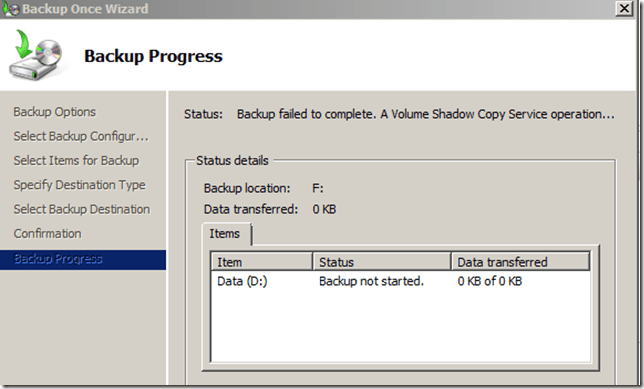
image

After that I looked into the SQL Server Errorlog and found the following errors:

2010-12-06 03:39:15.280 Backup       Error: 3041, Severity: 16, State: 1.2010-12-06 03:39:15.280 Backup       BACKUP failed to complete the command BACKUP DATABASE db68. Check the backup application log for detailed messages.

2010-12-06 03:39:15.370 spid53       Error: 18210, Severity: 16, State: 1.2010-12-06 03:39:15.370 spid53       BackupVirtualDeviceFile::PrepareToFreeze:  failure on backup device ‘{DB840D1B-DD17-4D73-83F1-7390F676DEE4}1’. Operating system error 995(The I/O operation has been aborted because of either a thread exit or an application request.).


I had already documented earlier that the infamous 995 error message could be a problem with the sqlvdi.dll but in this case, it is not!

The next thing I did was to pick the errors from the Application Event logs and I found the following errors repeated multiple times:

Error    12/6/2010 3:39:15 AM    SQLVDI    1    None    SQLVDI: Loc=SignalAbort. Desc=Client initiates abort. ErrorCode=(0). Process=3920. Thread=11604. Client. Instance=SQL2008. VD=Global\{DB840D1B-DD17-4D73-83F1-7390F676DEE4}1_SQLVDIMemoryName_0.Error    12/6/2010 3:39:15 AM    SQLWRITER    24583    None    Sqllib error: OLEDB Error encountered calling ICommandText::Execute. hr = 0x80040e14. SQLSTATE: 42000, Native Error: 3013

Error state: 1, Severity: 16

Source: Microsoft SQL Server Native Client 10.0

Error message: BACKUP DATABASE is terminating abnormally.

SQLSTATE: 42000, Native Error: 3224

Error state: 1, Severity: 16

Source: Microsoft SQL Server Native Client 10.0

Error message: Cannot create worker thread.

If you look closely at the above error, then you will find that the following error message stands out like a sore thumb: “Cannot create worker thread”. After this issue occurs, you will find that the SQLWriter shows the following when you execute the command: vssadmin list writers from a command prompt window:

Writer name: ‘SqlServerWriter’   Writer Id: {a65faa63-5ea8-4ebc-9dbd-a0c4db26912a}

   Writer Instance Id: {9075f235-fdee-4445-851b-a69c54bd8b33}

State: [8] Failed

Last error: Non-retryable error

Ensure that you do not have any memory related errors in the SQL Server Errorlogs or any DBCC MEMORYSTATUS outputs printed in the Errorlog during the time of the backup failure. If there aren’t, then the above issue occurs due to the SQL instance hitting a worker thread limit.

The reason for this is explained by Rob Dorr (Principal SQL Server Escalation Engineer at Microsoft) in his blog post:

The controller and database worker come from the worker pool.  So if your max worker thread is configured for 255 the answer would be a max of 255 / 2 = 127 databases.    You probably won’t get to 127 with this configuration as you have system workers (lazy writer, checkpoint, log writer, and others) that already are using workers.

On my SQL instance, I have 120 database and I need about 240 worker threads to complete this operation. However, I have only 128 worker threads configured for my SQL instance. If you have Dedicated Administrator Connection enabled for the SQL instance, then you can this troubleshooting further and execute a select against the DMV sys.dm_os_schedulers (for SQL Server 2005 or above) and get an output of the following type:

status                 counts
———————- ——–

HIDDEN ONLINE          168

VISIBLE ONLINE         8

VISIBLE ONLINE (DAC)   1

Query used:

select status, count(*) as counts
from sys.dm_os_schedulers
group by status

As you will see that there are about 168 hidden online schedulers created for performing the Snapshot backups. But SQL instance in question doesn’t have sufficient work threads to facilitate this operation.

What can you do in such situations:

1. Increase the number of worker threads to account for the additional worker threads required for completing the VSS backups. This can be counter-productive as it can lead to non-Buffer Pool memory contention on 32-bit instances of SQL Server. The higher the number of max worker threads on your SQL Server instance, more the amount of non-BPool memory is consumed for the thread stack. This results in depletion of the available Buffer Pool memory.

2. Change the physical location of the SQL Server database files so that all the database files do not reside on the same volume.

3. Perform a VSS Backup with SQL Server VSS Writer service turned OFF. However, you cannot recover any SQL Server database files from such a Volume Shadow Backup.

4. Use SQL Native backups or other VDI backup tools (non-Snapshot) to perform SQL Server database backups.

Note: This also happens when you select any file on a drive which has a high number of SQL Server database files. This is because the SQL Server VSS Writer tries to enumerate the database files for the SQL Server instance that reside on the volume that has been selected for the Snapshot backup.


Location of SQL Binaries can flip out Bare Metal backups

Bare Metal recovery allows system administrators to recover a system from failure within a short period of time and also manage system state backups in a more efficient manner. However, there is a slight catch here when you have SQL Sever binaries installed in a non-default location.

I recently worked on an issue where Windows Backup Admin was listing a non-system drive as a critical component when trying to perform a bare-metal backup using the following command:

wbadmin start backup -allcritical -backupTarget:<any existing drive name>:

When I looked into the contents of the drive, I found that the drive only had SQL Server database files and binaries on it. This is the output that I got:

wbadmin start backup -allcritical -backupTarget:S:
wbadmin 1.0 – Backup command-line tool
(C) Copyright 2004 Microsoft Corp.

Retrieving volume information…
This will back up volume OS(C:),New Disk(D:),New Disk(E:) to S:.
Do you want to start the backup operation?
[Y] Yes [N] No N

The operation ended before completion.

I then decided to use DiskShadow to show me all the critical components marked by the VSS Writers. I got the following output:

WRITER “System Writer”:

– Volumes affected by this component:

– \\?\Volume{2407f815-f9c4-11df-aef7-806e6f6e6963}\ [C:\]
– \\?\Volume{22c3ff31-f965-11df-a20b-00155df1c42a}\ [D:\]
– \\?\Volume{0342683d-f96a-11df-8a1f-00155df1c42a}\ [E:\]

This is because the SQL Server program binaries were installed on the D: and E: drives. And these are the paths that show up as critical as per the System Writer:

– d:\program files\microsoft sql server\100\dts\binn
– d:\program files\microsoft sql server\msas10.mssqlserver\olap\bin
– d:\program files\microsoft sql server\msrs10.mssqlserver\reporting services\reportserver\bin
– d:\program files\microsoft sql server\mssql10.mssqlserver\mssql\binn
– e:\program files\microsoft sql server\msas10.inst01\olap\bin
– e:\program files\microsoft sql server\msrs10.inst01\reporting services\reportserver\bin
– e:\program files\microsoft sql server\mssql10.inst01\mssql\binn

DiskShadow command used: list writers detailed

From http://msdn.microsoft.com/en-us/library/aa384630(VS.85).aspx

A volume is a critical volume if it contains system state information. The boot and system volumes are included automatically. The requester must include all volumes that contain system-critical components reported by writers, such as the volumes that contain the Active Directory. System-critical components are marked as “not selectable for backup.” In VSS, “not selectable” means “not optional.” Thus, the requester is required to back them up as part of system state.

Based on the above description, it is clear that I cannot perform a Bare Metal backup without including D: and E: drives.

Note: The above is just an example. There might be other system-critical components which are marked as not selectable for backup by other VSS Writers. VSS works on Volume Shadow concept. So, if a particular drive in a volume is marked as critical, then the entire volume would need to be backed up.

As I mentioned earlier, for system critical components, the “Is selectable: FALSE” is set (VSS_CF_NOT_SYSTEM_STATE flag is set for non-system components). In the above example, the drive on which the SQL binaries exist is marked as critical by the System Writer.