SQL Nexus: What StartTimeInterval?

When I get asked the same question more than 3 times in less than 48 hours, I guess it’s time to create some documentation around the error.

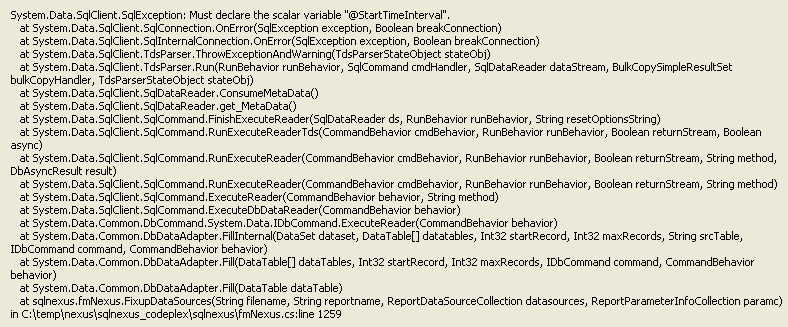
The issue is when you click on the UniqueStatements link in the ReadTrace_Main report in SQL Nexus, you get the following exception:
image

If you collect a profiler trace, you will find that the error is raised while executing the following command:

exec ReadTrace.spReporter_StmtTopN @StartTimeInterval, @EndTimeInterval, @TopN, @Filter1, @Filter2, @Filter3, @Filter4, @Filter1Name, @Filter2Name, @Filter3Name, @Filter4Name

The error message would be:

Error: 137, Severity: 15, State: 2
Must declare the scalar variable "@StartTimeInterval".

The above error will be reported in the exception message that is raised in SQL Nexus as well. The issue is not with SQL Nexus but with the RML Utilities report. You can get this issue under the following condition:

1. There are no entries in the readtrace.tblStatements and readtrace.tblTimeIntervals tables.
2. Or if you are using an older version of ReadTrace (RML Utilities)

I was able to reproduce the issue on ReadTrace.exe build of 9.01.0109.

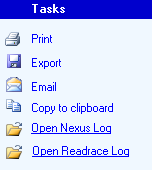
The issue stems from the fact that when you click on the UniqueStatements report link and no parameters are specified, thimagee Start Time and the End Time to be analyzed is picked up from the tblTimeIntervals. I was able to reproduce the issue on the same SQL Nexus database using one version of ReadTrace reports and not with the other. You can send an email to sstlbugs@microsoft.com and request the latest build for RML Utilities with the ReadTrace and SQL Nexus log file as attachments. The logs can be retrieved by clicking on the hyperlinks in SQL Nexus shown in the picture on the right.
del.icio.us Tags: ,,

QnA: Performance Dashboard Webcast

I had an overflow of questions during the webcast today and wasn’t able to answer a few as we ran short of time. I shall attempt to address the most common questions asked during the webcast.

How do I configure SQL Server Performance Dashboards?
SQL Server Performance Dashboard was originally released for SQL Server 2005. Setup instructions are available with the download link. However, the same install can be tweaked to work for SQL Server 2008 and SQL Server 2008 R2 using the blog post by Sudarshan: Configuring Performance Dashboard for SQL Server 2008
Download link: SQL Server 2005 Performance Dashboard

The SQL Server instance being monitored must be running SQL Server 2005 SP2 or later. After completing the installation, you must:
1. Run the Setup.sql file on each instance of SQL Server 200x that you wish to monitor with the SQL Server 2005 Performance Dashboard Reports.
2. Open the performance_dashboard_main.rdl file with the Custom Reports functionality new to Management Studio in SQL Sever 2005 Service Pack 2.

Does Performance Dashboard work for SQL Server 2000?
No, Performance Dashboard uses DMVs to generate the data for the reports which are available from SQL Server 2005 and higher.

Where can I get the presentation and webcast recording?
The presentation and webcast recording for the entire webcast series will be made available on the SQLServerFAQ MSDN blog. I shall post an update once both are available.

What is the performance impact of running these reports?
If your server is unresponsive or experiencing high CPU usage on all the processors, then these reports will also face issues while retrieving diagnostic data from the DMVs. However, the overall impact of running this reports on a SQL Server instance is very minimal as compared to any other performance diagnostic tool.

Can these reports be used on SQL Azure or any other RDBMS?
No, they cannot be used to monitor SQL Azure databases or any other non-SQL Server RDMBS environment.

What permissions are required for using Performance Dashboard?
You need to have VIEW SERVER STATE permission to view all the information exposed by Performance Dashboard as most of the information is collected from DMVs.

Can these reports be deployed to a local shared repository?
You can use Visual Studio and create custom reports similar to the Performance Dashboard reports or modify the existing reports as per your needs and deploy them. Be advised, that this will be a customized solution and not supported by CSS w.r.t. performance issues while running these reports or configuration issues.

Lastly, thank you for attending the session! And for your patience.

In case there are more questions, please feel free to add a comment and I shall reply back accordingly.

Cheers!


SQL MEME Monday #2

My first SQL MEME Monday, the brainchild of Thomas LaRock [Blog | Twitter], was to create a post less than or equal to 11 words. So here is my second post on the same theme:

Performance has lots of “It Depends” but it’s all about benchmarking!

Technorati Tags: SQL MEME Monday