Microsoft TechEd 2012–Multiple rows affected

WP_000363If you were at Microsoft TechEd India 2012 held at Bangalore, then you would agree with me without a shadow of doubt that it is quite difficult to write a wrap-up post of the entire event. The event for me was what I refer to as PPP. And by PPP, I am not talking about Point-to-Point Protocol. What I am referring to is a self-coined term…. People, Passion and Parallel.

People because it was great to connect a face to the twitter handle or online persona that you have interacted with in the past. What amazed me was some of the folks that I met at TechEd introduced themselves with their Twitter handle first and their actual name later! It is phenomenal to see how social media can empower collaboration between a technical community! The #TechEdIn twitter hashtag was trending on Twitter India in less than 15 minutes after the event started on Day 1 and continued to trend for the next three days!

Passion for technology that was evident from Day 1 to Day 3 where the rooms overflowed with people attending the sessions at different tracks. It was as if people were watching technical blockbusters at TechEd!

Parallel is the name of the game as everything that was happening at TechEd was in parallel… Whether it was the networking that was happening between folks or be in the technical sessions being delivered in parallel at the different tracks or the technology showcases displaying the several cool stuff from the sponsors at the venue. I heard multiple conversations in the hallways where debates were being raged (among the attendees) to decide on which session they should attend under which track! And obviously Twitter stands testament to the fact that such a dilemma existed since there were numerous tweets on this topic!

Since my daily bread and butter revolves around Microsoft SQL Server, it was quite obvious that I was lurking around the sessions which had remotely anything to do with data! On day one, I would be found mostly at “Data and Developer – Synergy with SQL Server” and on day three I was mostly at “Know Your Data – A Day in Life of a DBA”. Though there was a copious amount of information exchange in the session, there were also some really humorous moments which deserve a mention:

Vinod [B | T] and Pinal’s [B | T] session on “SQL Server Misconceptions and Resolution – A Practical Perspective” probably landed them as top candidates for a thin one and the fit one series in case they ever choose to pursue a media related career option!

Pinal Dave’s session on “Speed Up! – Parallel Processes and Unparalleled Performance” left people in splits…

Balmukund’s [B | T] session on “Keeping Your Database Available – ‘AlwaysOn’“ made learning fun and even though he had presented this in the past at other forums… This time around he came back with a totally new look and feel along with a high quality technical session on SQL Server 2012 AlwaysOn features with demos.

The VDI demo that I showed was using the “SQL Server Backup Simulator” which can be downloaded from here. The snapshot demo was shown using a modified version of the code present in the snapshot.cpp file from the Microsoft SQL Server Virtual Device Specification.

I had a lot of fun presenting my session on the “Lesser Known facts of SQL Server Backup and Restore” on March 23rd at TechEd. The slide deck used for the presentation is available below without a few situational humorous elements which wouldn’t really make sense to a person who had not attended the session. (Had to add the disclaimer before I got pulled up with comments that this was the incomplete slide deck!)

Here are some additional resources on VDI and VSS in case you want to indulge in some light reading Smile

IO Frozen messages while taking NT Backup for SQL databases
INFORMATIONAL- SHEDDING LIGHT on VSS & VDI Backups in SQL Server
Troubleshooting SQL Server Backup Issues
Incorrect Buffercount can cause Out of Memory Errors
VDI (VSS) Backup Resources
How It Works: SQL Server Backup Buffer Exchange (a VDI Focus)

The photographs from the session are available on TroubleshootingSQL’s Facebook page. Last but not the least, there needs to a be special vote of thanks to Pinal Dave who ensured that we had a seamless experience during the event.

The session recording is embedded below:

People… Passion… Parallel… @TechEdIn

Missing indexes and Create Index command from the procedure cache

Recently I was working on a performance issue for SQL Server where I needed to identify the missing indexes on the database instance. This was quite easy since I have a T-SQL script to do this which I have already blogged about before. Now the next task was to identify the SQL statements for which these indexes were suggested. Now this was also easy since my friend Jonathan Kehayias [B | T] had already blogged about this. The next ask now was to get the Create Index command for the list of missing indexes received! Well…. this time I ended up with a strike as I didn’t have any options with me. So I got down to modifying Jonathan’s T-SQL script to add to new commands to provide the CREATE INDEX statement in a separate column of the temporary table #MissingIndexInfo which his script creates.

ALTER TABLE #MissingIndexInfo ADD CreateIndexStatement varchar(8000)

UPDATE #MissingIndexInfo
SET CreateIndexStatement = ‘CREATE INDEX <index name>’ + ‘ ON ‘ + statement + ‘ (‘ + ISNULL (equality_columns,”) + CASE WHEN equality_columns IS NOT NULL AND inequality_columns IS NOT NULL THEN ‘,’ ELSE ” END + ISNULL (inequality_columns, ”) + ‘)’ + ISNULL (‘ INCLUDE (‘ + include_columns + ‘)’, ”)


Before you go ahead and start deploying these scripts to your environments, you need to be cognizant of the fact that the procedure cache may or may not have all the cached plans for all the queries that you want to examine. You would want to find out the missing indexes using the query here and compare it with the list that you retrieved using Jonathan’s query with the modification listed above. This sample script is an attempt to provide you with a list of indexes which may prove beneficial for your queries based on the Missing Indexes feature which was introduced in SQL Server 2005 and above. As always, you would still need to test before implementing these indexes onto a production server instance.

TechEd India 2012 Session

TechEd

TechEd India is always a much anticipated event and I always feel that this event keeps getting better year on year. This year I have the privilege of presenting at TechEd which is being held at Bangalore from March 21-23, 2012. My presentation topic is “Lesser Known Facts of SQL Server Backup and Restore”. The topic abstract is as follows:

Backup and restore are considered the most common tasks performed by DBAs. Most of the time the knowledge does not go beyond memorizing the syntax of backup and restore. In this session we will uncover some hidden facts which will change the perspective of DBAs towards this process.

What can you expect from this session?
image1. I will be talking about the some of the unknown facts about SQL Server database backup and restore which will help you streamline your backup performance and DR strategy.
2. Demo of a backup restore using a tool that I have written to show you some interesting statistics.
3. Clearing up some common myths around backup/restore.

I will delivering this session from 3:15PM IST – 4:15PM IST on SQL Server Administration track on Day 3 (March 23rd).

There will be other speakers like Pinal Dave [B | T], Vinod Kumar [B | T], Balmukund Lakhani [B | T] and Jacob Sebastian [B | T] who will not only help you gain knowledge but also have amazing demos in their presentations which will have you running the following query: SELECT REPLICATE(‘awesome’,1000) in your head!

If you haven’t already registered for TechEd yet, then you can do so by visiting the TechEd site. The Facebook event for my session is available here.

What IP are you listening on SQL

This is probably the easiest question to answer for any SQL Server DBA. And this is one of those scenarios where the adage “There are multiple ways to skin a cat” holds true. You could look into the SQL Server Errorlog and quickly look up the phrase “is listening on” and find lines of the following nature:

Server is listening on [ ‘any’ <ipv6> 1433].
Server is listening on [ ‘any’ <ipv4> 1433].

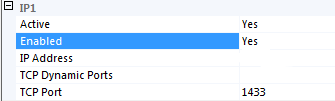
imageOr you could even use SQL Server Configuration Manager (SQL Server 2005 and above) to figure out the TCP/IP settings of the SQL instance. Now there is a catch here! If you see the screenshot, you will notice that the Listen All property is set to YES. This means that the SQL Server instance will listen on all the IP Addresses that the server/machine is configured to listen on. If this property was set to NO, then you moved over the IP Addresses tab (see screenshot), you would have see one of the IPs listed there which was Active and Enabled. (IP Address hidden in screenshot). All this seems simple enough, right? Then why am I taking the time to mention all these facts that you are already know and are probably questioning my sanity about writing such a post. Well…. If you had a let’s say a few hundred SQL Server instances from which you needed to fetch this information, then I can imagine how much you would relish the manual task of fetch this information. Both the options mentioned above, Errorlog and Configuration Manager, will not help you in this endeavor. Which is why I decided to leverage two of my best friends in the scripting world…. WMI and Powershell.

image

Using the namespace for SQL Server 2008: root\Microsoft\SqlServer\ComputerManagement10 and the class ServerNetworkProtocolProperty, you can fetch the TCP/IP settings for any SQL instance. The script illustrated below can be used to fetch the IP Address(es) that one SQL instance is listening on. You could write an outer loop to fetch the SQL Server instance names from a database or XML file and then use the script below to get the relevant data. If you want to SQL Server 2005 specific code, then the namespace to be used is root\Microsoft\SqlServer\ComputerManagement. Unfortunately for SQL Server 2000 and below, there are no WMI namespaces available to retrieve this information. In case you have SQL Server 2000 instances in your shop, then you would have to write Powershell code to fetch this information from the instance specific registry keys or using Select-String cmdlet to traverse the SQL Errorlog to retrieve this information. Note that the Errorlog approach has caveats in environments where the Errorlog is regularly recycled.

Addition: January 30, 2012: If you have specific IPs that a SQL Server failover cluster is listening on with the Listen All property set to TRUE, then the script can be modified such that only the Active and Enabled IP Addresses are reported by the script below. The part of the script which reports the IP Config output for the server can be omitted.

# This Sample Code is provided for the purpose of illustration only and is not intended to be used in a production environment. THIS SAMPLE CODE AND ANY RELATED INFORMATION ARE PROVIDED "AS IS" WITHOUT WARRANTY OF ANY KIND, EITHER EXPRESSED OR IMPLIED, INCLUDING BUT NOT LIMITED TO THE IMPLIED WARRANTIES OF MERCHANTABILITY AND/OR FITNESS FOR A PARTICULAR PURPOSE. We grant You a nonexclusive, royalty-free right to use and modify the Sample Code and to reproduce and distribute the object code form of the Sample Code, provided that You agree: (i) to not use Our name, logo, or trademarks to market Your software product in which the Sample Code is embedded; (ii) to include a valid copyright notice on Your software product in which the Sample Code is embedded; and (iii) to indemnify, hold harmless, and defend Us and Our suppliers from and against any claims or lawsuits, including attorneys’ fees, that arise or result from the use or distribution of the Sample Code.
# Author: Amit Banerjee
# Description: Powershell code to fetch the IP Addresses that the SQL instance is listening on.
# Notes:
# root\Microsoft\SqlServer\ComputerManagement10 - This namespace is applicable for SQL Server 2008 and above.
# For SQL Server 2005 the namespace is root\Microsoft\SqlServer\ComputerManagement
# There is no equivalent WMI namespace for SQL Server 2000 instance

# Provide the computer name that you want to query
$vComputerName = "."
# Provide the SQL instance name that you want the information for
# MSSQLSERVER for default instance
$vInstanceName = "MSSQLSERVER"

Write-Host "IP Address(es) that the SQL instance " $vComputerName "\" $vInstanceName " is listening on are listed below: "

$vListenAll = 0
$vTCPProps = get-WMIObject ServerNetworkProtocolProperty -ComputerName $vComputerName -NameSpace "root\Microsoft\SqlServer\ComputerManagement10" | Where-Object {$_.PropertyName  -eq "ListenOnAllIPs" -and $_.InstanceName -eq $vInstanceName}
foreach ($vTCPProp in $vTCPProps)
{
$vListenAll = $vTCPProp.PropertyNumVal
}

if($vListenAll -eq 1)
{
Write-Host "Is instance configured to listen on All IPs (Listen All property): TRUE"
# Get Networking Adapter Configuration
$vIPconfig = Get-WmiObject Win32_NetworkAdapterConfiguration -ComputerName $vComputerName

# Iterate and get IP address on which the SQL is listening
foreach ($vIP in $vIPconfig)
{
if ($vIP.IPaddress)
{
foreach ($vAddr in $vIP.Ipaddress)
{
$vAddr
}
}
}
}
else
{
# If SQL is configured to listen for specific IP addresses (eg. SQL clusters), then this else block will fetch those IP Addresses
# The Sort-Object ensures that the for-each loop below doesn't break while reporting the active and enabled IPs
$vIPProps = get-WMIObject ServerNetworkProtocolProperty -ComputerName $vComputerName -NameSpace "root\Microsoft\SqlServer\ComputerManagement10" | Where-Object {$_.InstanceName -eq $vInstanceName -and $_.ProtocolName  -eq "Tcp"} | Sort-Object IPAddressName,PropertyName
$vActive = 0
$vEnabled = 0

Write-Host "Is instance configured to listen on All IPs (Listen All property): FALSE"

foreach ($vIPProp in $vIPProps)
{
# Check if the IP is active
if ($vIPProp.Name -ne "IPAll" -and ($vIPProp.PropertyName -eq "Active"))
{
$vActive =  $vIPProp.PropertyNumVal
}
# Check if the IP is enabled
if ($vIPProp.Name -ne "IPAll" -and ($vIPProp.PropertyName -eq "Enabled"))
{
$vEnabled = $vIPProp.PropertyNumVal
}
# Report the IP if active and enabled
if ($vIPProp.Name -ne "IPAll" -and $vIPProp.PropertyName -eq "IPAddress" -and $vEnabled -eq 1 -and $vActive -eq 1)
{
# Get the IP addresses that SQL is configured to listen on
$vTCPProp.PropertyStrVal
}
}
}
Technorati Tags: ,,

SQL Saturday 76: The WiFi gods were happy


I just concluded my presentation on “Debugging the Deadlock for the Scheduler” at SQL Saturday 76 over a Lync meeting. The WiFi and Lync gods decided to be benevolent today and let me present without an untoward incident! As always it was fun to demonstrate the use of a debugger…Winking smileThe attempt of the presentation was to demonstrate what can be done proactively and reactively when dealing with a deadlocked schedulers condition.

A special thank you is due to all the sponsors without whom the event today wouldn’t have been possible: Microsoft New Zealand, RedGate, SQL Pass, New Zealand MS Communities and SQL Services!

The slide deck used for presentation today is available on Slide Share and is embedded below:

The demo files used are available at SkyDrive in the file SQLSat76_Demo.zip The walkthrough for the debugging that I explained along with the use of the Powershell script to automatically collect DMV outputs based on messages in the Windows Application event log are available using the posts available under the walkthroughs link below as well as the zip file mentioned above.

And last but not the least, a big Thank You to Dave [Twitter | Blog] for helping arrange all the logistics so that I could present and also for giving me this opportunity!

Resources:

Whitepaper: How To Diagnose and Correct Errors 17883, 17884, 17887, and 17888
http://msdn.microsoft.com/en-us/library/cc917684.aspx

Walkthroughs
https://troubleshootingsql.com/tag/deadlocked-schedulers/

WinDBG
http://msdn.microsoft.com/en-us/windows/hardware/gg463009

Microsoft Public Symbol Server
http://msdl.microsoft.com/download/symbols

KB: New concurrency and scheduling diagnostics have been added to SQL Server
http://support.microsoft.com/kb/319892/en-us

Cheers!