
Oh Image: Art thou valid?

Last week I had written a post on how to determine corrupt binary streams of images stored in a database: The case of the corrupt images. The main reason of that post was to determine the corrupt binary streams in the database before the SSRS reports accessing the inconsistent data while rendering reports and turning green in the face! So if you don’t have control over what is getting stuffed in the database (which is seriously a bad situation to be in), then here is another option for you if you are ready to use Custom Assemblies or Custom Code. I have decided to use a Custom Assembly for illustrating what I mean in this blog post. Ideally the image validation check should happen on the front end application/website from where the image is being uploaded into the database.

I am going to use a simple report which pulls a set of images from a database and displays them. I have two versions of the same report. The first report “Image_NoVerify” doesn’t use the custom assembly where as the “Image” report uses the fnImageValid function defined in VerifyImage.dll to determine the validity of the image.

The source code for the custom assembly is shown below:

/*

This Sample Code is provided for the purpose of illustration only and is not intended to be used in a production environment. THIS SAMPLE CODE AND ANY RELATED INFORMATION ARE PROVIDED "AS IS" WITHOUT WARRANTY OF ANY KIND, EITHER EXPRESSED OR IMPLIED, INCLUDING BUT NOT LIMITED TO THE IMPLIED WARRANTIES OF MERCHANTABILITY AND/OR FITNESS FOR A PARTICULAR PURPOSE. We grant You a nonexclusive, royalty-free right to use and modify the Sample Code and to reproduce and distribute the object code form of the Sample Code, provided that You agree: (i) to not use Our name, logo, or trademarks to market Your software product in which the Sample Code is embedded; (ii) to include a valid copyright notice on Your software product in which the Sample Code is embedded; and (iii) to indemnify, hold harmless, and defend Us and Our suppliers from and against any claims or lawsuits, including attorneys’ fees, that arise or result from the use or distribution of the Sample Code.

*/

using System;

using System.Collections.Generic;

using System.Linq;

using System.Text;

using System.Drawing;

using System.IO;

using System.Security.Permissions;

namespace VerifyImage

{

public static class Class1

{

public static String fnImageValid(byte[] vImgStream)

{

// The file name to store the image at

String vFilePath = @"C:\1.jpg";

// File system permissions asserted to prevent security exceptions while saving the file

FileIOPermission filePerm = new FileIOPermission(System.Security.Permissions.PermissionState.Unrestricted);

filePerm.Assert();

// Check for nulls

if (vImgStream == null)

return "NULL image";

// Store the image on the filesystem

FileStream fs = new FileStream(vFilePath, FileMode.Create, FileAccess.Write);

try

{

// Zero KB image detection

if (vImgStream.GetUpperBound(0) > 0)

{

fs.Write(vImgStream, 0, vImgStream.GetUpperBound(0));

}

else

{

fs.Close();

return "ZERO KB Image detected";

}

}

catch (Exception)

{

fs.Close();

return "Unable to write image to disk";

}

fs.Close();

// Check image saved on filesystem for validity

try

{

using (FileStream fsRead = new FileStream(vFilePath, FileMode.Open, FileAccess.Read, FileShare.Read))

{

using (StreamReader sr = new StreamReader(fsRead))

{

try

{

try

{

// Try and check if the seek is possible. If it fails, then we have problems!

fsRead.Position = 0;

fsRead.Seek(0, SeekOrigin.Begin);

}

catch { }

using (Image img = Image.FromStream(fsRead))

{

// IF there are no errors, then report success

img.Dispose();

fsRead.Close();

return "Valid Image";

}

}

catch (Exception)

{

fsRead.Close();

return "Corrupt Image Detected";

}

}

}

}

catch (Exception Ex)

{

return "Exception Caught: " + Ex.Message.ToString() + ":" + Ex.StackTrace.ToString();

}

}

}

}

You would also need to modify the rssrvpolicy.config file to ensure that the assembly doesn’t fail with permission errors when it is used while executing the report. Note that the values mentioned below is to get this working. You might need to make additional changes for making the security permissions more granular to satisfy the security requirements in your environment.

 <CodeGroup class=”UnionCodeGroup”
version=”2″
PermissionSetName=”FullTrust”
Name=”MyCodeGroup”
Description=”Code group for VerifyImage extension”>
<IMembershipCondition class=”UrlMembershipCondition”
version=”2″
Url=”C:\Program Files\Microsoft SQL Server\MSRS10_50.MSSQLSERVER\Reporting Services\ReportServer\bin\VerifyImage.dll”
/>
</CodeGroup>

imageWhen the Image report is saved as a PDF file, you will see the following output for a valid image. The text box uses the following expressionimage to display the output shown in the screen shot on the left:

=Is Image Valid: ” + Fields!SNO.Value.ToString() + VerifyImage.Class1.fnImageValid(Fields!Document.Value).ToString()

If the image is inconsistent, then you will see one of the following outputs shown in the screenshots on the right. You can extend this further by displaying the image only if the function fnImageValid returns true. If the function returns a false, then you can use a stock image to let the user know that image is corrupt. This way you can prevent rendering failures.

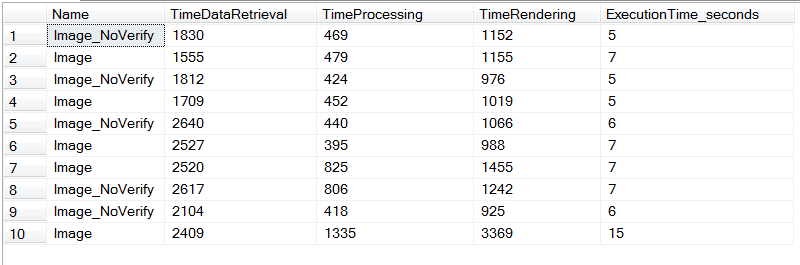
imageAs you can see from the data retrieved from the ExecutionLogStorage table in the ReportServer database that the image verification check at times can increase the execution time of the report. Since I am using only a few images to create the report, the execution times in the table mentioned below are comparable. However, if the images are larger or the number of images are more, then the report execution time will increase due to additional validation check processing which wouldn’t necessarily be a linear increase in execution time.

Note that invalid image streams when used in SQL Server 2008 Reporting Services and lower releases results in exceptions being thrown by Reporting Services and causes mini-dumps to be generated.

The DLL was placed in the following locations for the above example to work:

C:\Program Files\Microsoft SQL Server\MSRS10_50.MSSQLSERVER\Reporting Services\ReportServer\bin
C:\Program Files\Microsoft Visual Studio 9.0\Common7\IDE\PrivateAssemblies

I had achieved this using a Post Build event which would automatically copy the latest version of the DLL to the two above mentioned folders. This beats having to manually copy paste the DLL every time I build it.
image

References:

Custom Code and Assembly References in Expressions in Report Designer (SSRS)
http://technet.microsoft.com/en-us/library/ms159238.aspx

How to use custom assemblies or embedded code in Reporting Services
http://support.microsoft.com/kb/920769

SQL Saturday #76: Gearing up for the fun remotely

imageI am quite excited about this Saturday (January 28th, 2012) which will witness SQL Saturday #76 being organized at Auckland. This time around I will not be physically present for the event but will be presenting via Live Meeting on “Debugging the deadlock for the scheduler”. It would have been awesome to be there in person but I shall make the most of the remote opportunity! As they say… If wishes were horses, even beggars would ride! I am going to show you some cool stuff that you can do when you encounter a Deadlocked Schedulers scenario in SQL Server including a demo on debugging a SQL dump!

There are a bunch of other interesting sessions on a whole gamut of topics for you to pick and choose from! Space is limited so if you want to attend and be part of the fun and learning, then get yourself registered here pronto. The list of sessions that for the day are available here.

Venue: Microsoft New Zealand, Level 5, 22 Viaduct Harbour Ave, Auckland CBD
Date: January 28th, 2012
Time: Registration opens at 8.30AM NZ time | Event will conclude around 5PM NZ time

Looking forward to another fun-filled Saturday! Winking smile

The case of the corrupt images

I was recently working on an environment where there was a need to find find out corrupted image streams in a database in the form of BLOBs. You might say why not run a CHECKDB on the entire table and find out if there are any inconsistencies. Well if it were that simple, I probably wouldn’t have started penning this post! 🙂 Let me give you a bit of history here to set things in perspective…. The binary stream was inconsistent when the data was inserted into the database. So this was a clear case of “Garbage In Garbage Out”.

imageWhat made the problem take a convoluted turn was the use of this BLOB data in SQL Server Reporting Services reports. If you have reports which convert BLOB data into images before rendering them into reports, then the rendering would fail if the binary stream is inconsistent. When you have a few images in the table, it’s quite possible to manually identify the inconsistent BLOB data. Now when the number of images stored in the database moves to tens of millions, I am sure the DBA will find it very amusing to spend a years looking through the images manually! So what really shows up as the image when you have a corrupted binary stream in a SSRS report is just a Red “x”! (see left).

Since the manual option didn’t seem very palatable, I thought it might be time for some automation. And that is where C# came to my rescue. The logic was very simple. Pick an image of the database, store it on the filesystem in JPG/PNG/BMP format and then verify it’s validity. There are three ways that the image being rendered can have an issue:

1. There is no image in the BLOB column in the database i.e. the column value is NULL. This is quite easy to circumvent by using the IS NOT NULL filter or the ISNULL function.
2. The image column value is not null but it stores a 0KB image which will again create a problem during the report rendering phase. This still ain’t that bad a problem as we can search for images with binary data values as 0x00 or 0x0 with relative ease!
3. The third type of image is the main problem where there might be a few bit flips or part of the binary stream is inconsistent. This makes it exceptionally difficult to locate beforehand which images will fail to render while generating the report.

0x89504E470D0A1A0A0000000….
NULL
0x0

0x89504E47309AFD068163D86……

If you look at the binary streams above, the last three fall under categories described above. All the image streams in read will create a problem. The first and last streams look valid but the fourth stream is invalid even though if it has a valid header.

Using the code below, you could identify the three different failure scenarios by scanning all the images that are stored as BLOBs in your database. Though if you have the need to undertake this task, then it is advisable that you perform such a validity check during off business hours.

using System;
using System.Collections.Generic;
using System.Linq;
using System.Text;
using System.IO;
using System.Drawing;
using System.Data;
using System.Data.SqlClient;

namespace ImageCheck
{

class Program
{
static void Main(string[] args)
{
// While loop to iterate through the database table
int ctr = 1;
while (ctr <= 24)
{
ReValidateImage(ctr);
ctr++;
}

// Wait for user input before exiting
Console.ReadKey();
}


public static void ReValidateImage(int SNo)
{

bool vImgCheck;
// SQL query to fetch the image
string sql = "SELECT SNo,[Document] from dbo.myTable WHERE SNo = " + SNo.ToString();

SqlConnection con = new SqlConnection("Server=.;Integrated Security=True;database=ReportDB");
SqlDataAdapter da = new SqlDataAdapter(sql, con);
SqlCommandBuilder MyCB = new SqlCommandBuilder(da);
DataSet ds = new DataSet("MyImages");
byte[] MyData = new byte[0];

// Fetch the image into a dataset
da.Fill(ds, "MyImages");
DataRow myRow;

myRow = ds.Tables["MyImages"].Rows[0];

// Store the image on the filesystem
try
{
if (myRow["document"] != null)
{
MyData = (byte[])myRow["document"];
int ArraySize = new int();
ArraySize = MyData.GetUpperBound(0);
// Handle ZERO kb image size
if (ArraySize > 0)
{
FileStream fs = new FileStream(@"C:\1.jpg", FileMode.OpenOrCreate, FileAccess.Write);
fs.Write(MyData, 0, ArraySize);
fs.Close();
// Check image saved on filesystem for validity
using (FileStream fsRead = new FileStream(@"C:\1.jpg", FileMode.Open, FileAccess.Read, FileShare.ReadWrite))
{
using (StreamReader sr = new StreamReader(fsRead))
{
vImgCheck = IsValidImage(fsRead);
if (vImgCheck == true)
Console.WriteLine("Image is OK for iteration " + SNo.ToString());
else
Console.WriteLine("Image is corrupt for iteration " + SNo.ToString());
}
}
}
else
{
// Report ZERO kb images
Console.WriteLine("Image size is ZERO for iteration " + SNo.ToString());
}
}
}
catch (SystemException ex)
{
// Handle NULLs extracted from the database
if (ex.GetType().ToString() == "System.InvalidCastException")
Console.WriteLine("Cannot export image for iteration " + SNo.ToString());
}
}
// Function to check validity of an image
public static bool IsValidImage(Stream stream)
{
try
{
try
{
// Try and check if the seek is possible. If it fails, then we have problems!
stream.Position = 0;
stream.Seek(0, SeekOrigin.Begin);
}
catch { }
using (Image img = Image.FromStream(stream))
{
// IF there are no errors, then report success
img.Dispose();
return true;
}
}
catch
{
return false;
}


}
}

A sample output of the above code when executed against a table which has two columns SNo (int) and Document (image) with SNo being the primary key would look like this:

Image is OK for iteration 1
Image size is ZERO for iteration 2
Cannot export image for iteration 3
Image is corrupt for iteration 4
Image is corrupt for iteration 5
Image is corrupt for iteration 6

So what can you do with the above code1? Firstly, you would need to modify the functions to align with the schema of your table. The second TO-DO item would be to write another function for storing the inconsistent binary stream row details in a text file or into a database table. You could even add an user interface if you want to go all out fancy!

Disclaimer: This Sample Code is provided for the purpose of illustration only and is not intended to be used in a production environment. THIS SAMPLE CODE AND ANY RELATED INFORMATION ARE PROVIDED “AS IS” WITHOUT WARRANTY OF ANY KIND, EITHER EXPRESSED OR IMPLIED, INCLUDING BUT NOT LIMITED TO THE IMPLIED WARRANTIES OF MERCHANTABILITY AND/OR FITNESS FOR A PARTICULAR PURPOSE.

SQL Saturday #116: A first but definitely not the last

Last weekend we successfully concluded SQL Saturday #116 which was the first ever SQL Saturday organized in India. I had the opportunity to present at the event and it was definitely an experience that I enjoyed immensely! Right at the outset, I want to call out two aspects of the event:

  • The audience – The audience participation and enthusiasm was amazing without whom this event wouldn’t have been a success!
  • Our sponsors, volunteers and SQL PASS – It’s needless to say that the event without the support of our sponsors and volunteers wouldn’t have been possible!

The event had two tracks with even a SQL Server Clinic which was like an Ask-the-Expert session where you could bring the problems that you experience with SQL Server and discuss it with the SQL experts from CSS. This was a new addition which was the brainwave of my colleague, Tejas Shah [Twitter]. If you have attended the SQL Pass Summit, then you will be familiar with this concept.

I was presenting on Demystifying SQL Server Memory Dumps which I thoroughly enjoyed presenting! I have already uploaded my presentation to the SQL Saturday website. All the debugging demos shown are available under the debugging category tag on my blog.

Thank you everyone who attended in making this a fun event for us!!

Here are some other blog posts on the event from other speakers/attendee: Lohith [Speaker], Sudeepta [Attendee/Volunteer], Manas [Volunteer/Attendee], Varun Dhawan [Attendee] and Vinod Kumar [Speaker].

DSC00023

Technorati Tags: ,,

SQL Saturday #116: Are you gonna be there?

I am really looking forward to SQL Saturday 116 which is the first SQL Saturday being organized in Bangalore at the Microsoft Office on January 7th, 2012. There are some interesting stuff lined up for the day with two different tracks: Main and Practical. You can look up the schedule here.

Not only do you have an amazingly line-up of speakers but there’s also going to be a SQL Server Clinic. Those of you who have attended the SQL Pass Summit might be familiar with this concept where you have MSFT CSS Engineers having deep technical expertise in SQL Server available to you to discuss your real-world SQL problems that you face in your environments that you manage or work on. We love the challenge of new problems that we have not seen before and derive immense amount of satisfaction in helping someone resolve a tough or difficult issue involving SQL Server! If you have a specific problem to solve, it helps to bring the details. ERRORLOG files, error messages, specific query syntax, or details of your environment. The more background context you provide us with, the more we can narrow down with our suggestions. No presentations, just some serious troubleshooting and on-the-spot assistance from 2:30PM IST – 5PM IST under the Practical track.

I am glad that I will have the opportunity of presenting at SQL Saturday #116 along with the likes of Pinal Dave [Blog | Twitter], Vinod Kumar [Blog | Twitter] and Balmukund Lakhani [Blog | Twitter]. My presentation topic reads “Demsytifying SQL Server Memory Dumps” at 11:30AM IST. As the topic reads, I am going to clarify why digging into the root causes which result in SQL Server memory dumps might not be a daunting task!

I am totally looking forward to Jan 7th!! That would be a cracker of way to start off the first weekend on the New Year! Are you gonna be there?