Powershell for the perfmon files

Recently, I was working on a requirement to convert a number of BLG files into CSV and then changing the CSV files into Excel files.

So, the script below does the following:

1. Picks the BLG files from a folder and then creates a CSV file from the BLG file using RELOG.EXE

2. Then the same CSV file is converted to a XLS file

As always, this is a Powershell script which can be adapted in any way possible. Happy perfmon analysis!

The script can be downloaded from OneDrive as well.


#################################################################################
#                                        #
#                                        #
#                                        #
#                                        #
#    Script Name: Relog                            #
#    Author: Amit Banerjee                            #
#    Date: May 10, 2014                            #
#    Description:                                 #
#    The script uses relog to create CSV files from BLG files         #
#    It then converts the CSV files to XLS files                 #
#                                        #
#                                        #
#                                        #
#                                        #
#                                        #
#################################################################################

# This Sample Code is provided for the purpose of illustration only and is not intended to be used in a production environment. THIS SAMPLE CODE AND ANY RELATED INFORMATION ARE PROVIDED "AS IS" WITHOUT WARRANTY OF ANY KIND, EITHER EXPRESSED OR IMPLIED, INCLUDING BUT NOT LIMITED TO THE IMPLIED WARRANTIES OF MERCHANTABILITY AND/OR FITNESS FOR A PARTICULAR PURPOSE. We grant You a nonexclusive, royalty-free right to use and modify the Sample Code and to reproduce and distribute the object code form of the Sample Code, provided that You agree: (i) to not use Our name, logo, or trademarks to market Your software product in which the Sample Code is embedded; (ii) to include a valid copyright notice on Your software product in which the Sample Code is embedded; and (iii) to indemnify, hold harmless, and defend Us and Our suppliers from and against any claims or lawsuits, including attorneys fees, that arise or result from the use or distribution of the Sample Code.

# Enumerates BLG files on disk and starts running relog on them
$path = "C:\PerfmonFiles\" # Replace with correct path
$files = Get-ChildItem $path -Filter *.blg
foreach ($file in $files)
{
    # Create the CSV filename
    $filename = $file.FullName.Split(".")[0] + ".csv"
    # Run relog with the correct arguments
    $AllArgs =  @($file.FullName,  '-f', 'csv', '-o',  $filename)
    & 'relog.exe' $AllArgs
}

# Enumerates CSV files on disk and starts converting them to Excel
$files = Get-ChildItem $path -Filter *.csv 
foreach ($file in $files)
{
    # Launch Excel
    $xls = new-object -comobject excel.application
    $xls.visible = $true
    # Open the CSV file
    $Workbook = $xls.workbooks.open($file.FullName)
    $Worksheets = $Workbooks.worksheets
    $filename = $file.FullName.Split(".")[0] + ".xls"
    # Save the file as Excel
    # Depending on your compatibility settings you might have to accept a prompt to save the file
    $Workbook.SaveAs($filename,1)
    $Workbook.Saved = $True
    # Close Excel
    $xls.Quit()
    # Delete the CSV file
    Remove-Item $file.FullName
}

A full house–We could not have asked for more

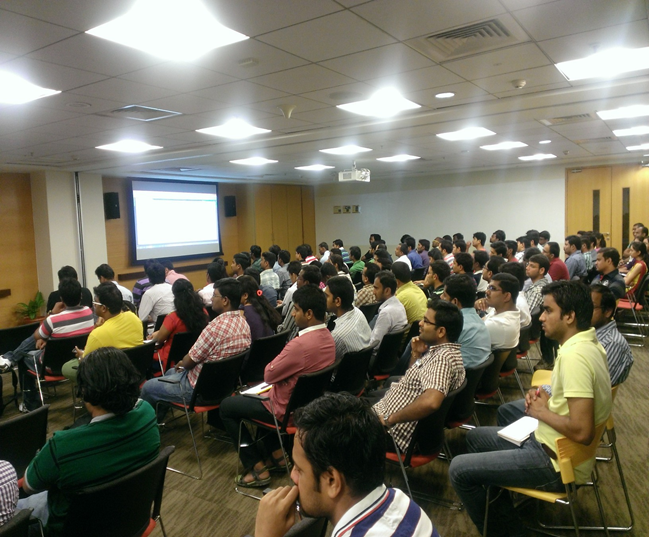
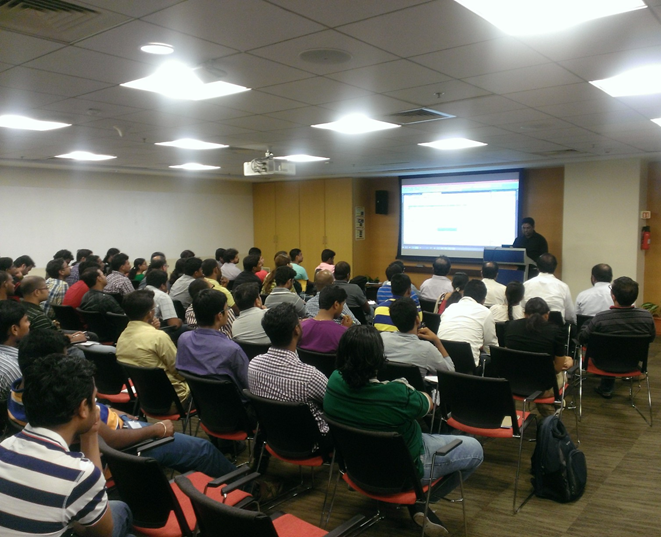
The turnout at today’s event had an overwhelming response today. A big thank you to everyone who attended today’s event. An overwhelming response… So thank you everyone who attended and made this UG meeting a grand success! This was our very own version of introducing SQL Server 2014 to the SQLBangaloreUG community!

We had a brilliant line-up of topics… Just to re-cap the day.. Here is a short summary..

The day started off with a keynote session from Anupam Tiwari who is Business Program Manager and closely works with the team that supports developer technologies at Microsoft. He talked about where IT as we know it today is headed tomorrow.

Sourabh Agarwal [Blog | Twitter] covered the performance enhancements in SQL Server 2014 and explained why this version is bigger, faster and stronger! Smile

Then I had the opportunity of explaining the new enhancements in backup and restore in SQL Server 2014. I talked about backing up to a URL i.e. a storage account in Azure, managed backups to Azure and encrypted backups. The slide deck from today’s presentation is available below.

This was followed by Pinal Dave’s [Blog | Twitter] session on “Performing an effective Presentation” One key takeaway from this session is that the art of story-telling can weave out a presentation which can keep the audience hooked! He demonstrated this during his session and kept the audience awake after lunch! Smile

Then we had Balmukund Lakhani [Blog | Twitter] talking about InMemory Enhancements with SQL Server 2014. You can follow his SQL Server 2014 learning series to gain in-depth insights into the various enhancements that he talked about.

His session was followed by Vinod Kumar [Blog | Twitter] who talked about the Some more lesser known enhancements with SQL Server 2014 where he talked about managed lock priority, delayed durability and more.

And last but not the least was Kane Conway – (Support Escalation Engineer at Microsoft) who talked about Power Packed – Power BI with SQL Server. If you have not played around with PowerBI, then you should start now! Presenting data with compelling visualizations just got a new definition.

image image

It was a house full event and I had to put in two pictures to showcase the turnout today! It is not possible to have a successful event without the audience participation. We personally want to apologize to folks who came in late and had to return because the hall was overcrowded and the seats were full. Please do come in early for next UGs for sure.

A special thanks to Microsoft GTSC for giving us the space and the support till date. Also a special thanks to SQL Server Product Marketing team for sponsoring this Launch Event. Finally, a special thanks to team Pluralsight for supporting the UG till date and giving us numerous gifts as giveaway at the event.

The presentation that I used at the event today is available below:

Bangalore Community gets a peek at SQL Server 2014

SQL Server 2014 which was recently released will now receive special attention at the SQL Bangalore UG Meet scheduled to happen on Saturday, May 3rd, 2014. We are  conducting a full-day event for a SQL Server 2014 Community Launch at the SQL Bangalore UG. So don’t miss the opportunity to come and learn some of the new cool features introduced with SQL Server 2014.

I will be presenting on Backup Enhancements in SQL Server 2014 and will show you some exciting new features. This will get you thinking about your backup strategy when you upgrade to SQL Server 2014.

Just to tickle your learning taste buds, the agenda for the day is mentioned below:

Backup Enhancements with SQL Server 2014
Performance Enhancements with SQL Server 2014
Sourabh Agarwal [Blog | Twitter] – An active member on SQLBangalore community!

LUNCH BREAK

Performing an effective Presentation by Pinal Dave [Blog | Twitter] – He does not require an introduction!
InMemory Enhancements with SQL Server 2014 by Balmukund Lakhani [Blog | Twitter] – One of the most helpful people in the SQL community!
Some more lesser known enhancements with SQL Server 2014 by Vinod Kumar [Blog | Twitter] – Another individual who needs no introduction!
Power Packed – Power BI with SQL Server by Kane Conway – (Support Escalation Engineer at Microsoft) – A technical expert who will explain to about what PowerBI can do for you and your organization!

Register for the event (registration link) and feel free to pass along the message. The day will have an early start… 9.30AM!! Get your learning hats on and come visit us on Saturday!

Venue:
Microsoft Corporation, Signature Building,
Embassy Golf Links Business Park,
Intermediate Ring Road,
Domlur, Bangalore – 560071

SQL Server 2012: Trace Flags

This is something that I have been planning to release for some time but just have not been able to get to mainly due to procrastination! So this new year, I decided to get down to it! A list of all the publicly documented SQL Server 2012 Trace Flags.

The list below shows the trace flags available in SQL Server 2012 along with whether the trace flag can be enabled as a startup parameter or using DBCC TRACEON command or both.

SQL Server exposes multiple trace flags which are required to set specific server characteristics or to switch off a particular behavior. Some trace flags are required to enable the fix post the installation of the update.

This is currently a work-in-progress. The trace flags mentioned in the table below have the associated public article links mentioned which provide more information about the trace flag.

If you want a trace flag to be mentioned in the list below, then feel free to leave a comment. Note that only publicly documented trace flags will appear in this list.

The list of trace flags available for SQL Server 2005 are documented here.

The list of trace flags available for SQL Server 2008 are documented here.

Disclaimer
1. Data mentioned below is as of 14th January, 2014.
2. Trace flags should be used under the guidance of Microsoft SQL Server support.  They are used in this post for discussion purposes only and may not be supported in future versions.
3. Trace flags for hotfixes should be only enabled if the fix is applicable to the SQL Server instance that you are enabling the trace flag on.

Legend
Startup: If Y,Trace flag can be enabled by adding the trace flag number as a startup parameter using –T<trace flag number>
DBCC: If Y, Trace flag can be enabled using DBCC TRACEON(<trace flag number>,-1)

Trace Flag Description KB Startup DBCC
205 Report when a stored procedure is being recompiled. This trace flag will write the a corresponding message to the SQL Server errorlog. 195565 Y Y
260 Prints versioning information about extended stored procedure dynamic-link libraries (DLLs). For more information about __GetXpVersion(). BOL Link Y Y
610 Minimally logged inserts for indexed tables for fast load scenarios. Read article for limitations. Article Y Y
652 Disable pre-fetch scans 920093 Y Y
661 Disable ghost removal process 920093 Y Y
806 Audit failure during a read operation is reported in the errorlog as a 823 message on enabling this trace flag 841776 Y Y
815 Detect unwanted changes to in-memory SQL Server data pages, latch enforcement is enhanced with this trace flag enabled Article Y Y
818 Detect stale reads. Very helpful in analyzing recurring data corruption issues. Article Y Y
830 Suppress stuck-stalled I/O warnings Article Y Y
834 Use Microsoft Windows large-page allocations for the buffer pool. Only applies to 64-bit instances. 920093 Y N
836 Use the max server memory option for the buffer pool. Only applicable for 32-bit SQL Server 920093 Y N
840 On Standard edition, allows larger I/O extent reads to populate the buffer pool when SQL Server starts 912322 Y Y
1106 Enable tempdb allocation trace. Not suggested for production use. 947204 Y Y
1117 Even growth of all files in a file group Whitepaper Y Y
1118 Prevents allocation of pages from mixed pages for all databases 328551 Y Y
1204 Returns the resources and types of locks participating in a deadlock and also the current command affected. Useful for SQL Server 2000. BOL Link Y Y
1205 Prints information about each deadlock search 832524 Y Y
1211 Disabled lock escalation BOL Link Y Y
1222 Returns the resources and types of locks that are participating in a deadlock and also the current command affected, in an XML format that does not comply with any XSD schema. To be used for SQL Server 2005 and above. BOL Link Y Y
1224 Disables lock escalation based on the number of locks BOL Link Y Y
1260 Disabled mini-dump for non-yield conditions Whitepaper Y Y
1262 Dump everytime a non-yielding scheduler condition is detected. Article Y Y
1439 Trace database restart and failover messages to SQL Errorlog for mirrored databases 983500 Y Y
1448 Prevent replication latency with database mirroring enabled. Apply KB 983480 to prevent issues after enabling -T1448. 937041 Y Y
2301 Enable advanced decision support optimizations 920093 Y Y
2340 Disable batch sort to reduce CPU consumption Blog Y Y
2371 Use a modified threshold for auto update statistics 2754171 Y Y
2389 Automatically generated quick statistics for known ascending keys 922063 N Y
2390 Automatically generated quick statistics for all columns that include known ascending keys or unknown ascending keys 922063 N Y
2528 Disables parallel checking of objects by DBCC CHECKDB, DBCC CHECKFILEGROUP, and DBCC CHECKTABLE. Article Y Y
2544 Put maximum information in a dump file (all memory in the process). Can lead to a very large dump file size for 64-bit and 32-bit systems with AWE enabled. Article Y Y
2546 Dump all threads in a process. Can lead to a very large dump file size for 64-bit and 32-bit systems with AWE enabled. Article Y Y
2551 Generate a filtered dump of the SQL Server process. Reference Y Y
3004 Write extended information about backup/restore to Errorlog Blog N Y
3014 Write extended information about backup/restore to Errorlog Blog N Y
3023 Automatically enable CHECKSUM for BACKUP command 2656988 N Y
3042 Bypasses the default backup compression pre-allocation algorithm to allow the backup file to grow only as needed to reach its final size Article Y Y
3205 Disable hardware compression for tape drives. Article N Y
3213 Display backup/restore configuration parameters Blog N Y
3226 Suppress successful backup messages in the logs Article N Y
3502 Displays start and end of checkpoint. Can be very verbose and increase your transaction log size very quickly 815436 Y Y
3504 Print Checkpoint summary Blog Y Y
3505 Disable Checkpoint 815436 Y Y
3604 Send trace output to client Y Y
3605 Send trace output to SQL Errorlog Y Y
3608 Prevents SQL Server from automatically starting and recovering any database except the master database Article Y N
3625 Limits the amount of information returned to users who are not members of the sysadmin fixed server role, by masking the parameters of some error messages. Article Y N
3688 Needed to enable fix for issue mentioned in KB Article. 922578 Y N
4010 Allows only shared memory connections to the SQL Server Blog Y Y
4022 Skips launching automatic stored procedures when SQL Server starts. This is equivalent to setting “scan for startup procs” configuration option to 0. Article Y Y
4029 Push more verbose errors to the errorlog when read+write errors occur in the network layer on the server side. Blog Y Y
4199 Controls multiple query optimizer changes previously made under multiple trace flags. Refer article for more details. 974006 Y Y
4606 Disables password policy check during server startup Blog Y Y
4610 Increases the size of the hash table that stores the cache entries by a factor of 8. 959823 Y Y
4616 Makes server-level metadata visible to application roles Article Y Y
4618 Limit the number of entries in the TokenAndPermUserStore store 959823 Y Y
4621 Control TokenAndPermUserStore store size using registry value (Applies only to SQL Server 2005. For SQL Server 2008 and above, please refer 959823) 959823 Y Y
6527 Disables generation of a memory dump on the first occurrence of an out-of-memory exception in CLR integration Article Y Y
7806 Enables a dedicated administrator connection (DAC) on SQL Server Express Article Y N
8002 Treat affinity mask like processor affinity 818765 Y Y
8004 Create memory dump for the first occurrence of out-of-memory condition Article Y Y
8011 Disable the ring buffer for Resource Monitor 920093 Y Y
8012  Disable the ring buffer for schedulers 920093 Y Y
8018 Disable the exception ring buffer 920093 Y N
8019 Disable stack collection for the exception ring buffer 920093 Y N
8020 Disable working set monitoring 920093 Y N
8024 Performs additional checks before generating non-yielding condition dump Whitepaper Y Y
8032 Reverts the cache limit parameters to the SQL Server 2005 RTM setting which in general allows caches to be larger Article Y N
8048 Forces CPU based partitioning Blog Y N
8602 Ignore all index hints Whitepaper Y Y
8721 Will dump information into the error log when AutoStat has been run. 195565 Y Y
8744 Disable pre-fetching for ranges 920093 Y Y

Default Trace–Performance Issues

There are multiple events that a default trace in SQL Server 2005 and above tracks which can be significantly useful for finding out areas of improvement. The events that I will be concentrating on are:

1. Missing Column Statistics – This event class indicates that column statistics that could have been useful for the optimizer are not available due to which an incorrect cardinality estimation could occur. This can cause the optimizer to choose a less efficient query plan than expected. You will not see this event produced unless the option to auto-create statistics is turned off.

2. Missing Join Predicate – This event class indicates that a query is being executed that has no join predicate. (A join predicate is the ON search condition for a joined table in a FROM clause.) This could result in a long-running query. This event is produced only if both sides of the join return more than one row.

3. Sort Warnings – This event class indicates that sort operations do not fit into memory. This does not include sort operations involving the creation of indexes, only sort operations within a query (such as an ORDER BY clause used in a SELECT statement). The EventSubClass field in this event shows whether this was a single pass or a multiple pass. A single pass (EventSubClass = 1) is when the sort table was written to disk, only a single additional pass over the data was required to obtain sorted output. A multiple pass (EventSubClass = 2) is when the sort table was written to disk, multiple passes over the data were required to obtain sorted output. A multiple pass is an enemy of query performance.

4. Hash Warnings – This event class can be used to monitor when a hash recursion or cessation of hashing (hash bailout) has occurred during a hashing operation.  Hash recursion (EventSubClass = 0) occurs when the build input does not fit into available memory, resulting in the split of input into multiple partitions that are processed separately. Hash bailout (EventSubClass = 1) occurs when a hashing operation reaches its maximum recursion level and shifts to an alternate plan to process the remaining partitioned data. Hash bailout usually occurs because of skewed data. Another enemy of performance!

5. Server Memory Change – This event class occurs when Microsoft SQL Server memory usage has increased or decreased. You can even determine what is the current memory usage after the increase or decrease.

6. Log File Auto Grow – This event class indicates that the log file grew automatically. This event is not triggered if the log file is grown explicitly through ALTER DATABASE. Frequent log file growths are not food for performance.

7. Data File Auto Grow – This event class indicates that the data file grew automatically. This event is not triggered if the data file is grown explicitly by using the ALTER DATABASE statement.

Since this information is already available in the default trace, I decided to use my Default Trace Statistics Power View Excel sheet to track this information graphically. And this is what I got (see screenshot 1)!

DefaultTrace_PerfIssues

So what is the above Excel sheet displaying?

1. The information available in the first column chart will show the Data and Log file grow events per database.

2. The first matrix in the middle of the Excel sheet shows the number of Sort Warnings and Hash Warnings with drill-down capabilities for each database to see the EventSubClass fields.

3. The second matrix shows the Missing Column Statistics and the Missing Join Predicate events for each database. The drill-down capability gives the name of the column statistics that was missing.

4. The line graph shows the change in memory for the SQL Server database engine.

Happy monitoring!

Previous posts in this series:

Schema Changes History Report