 It’s time for another round of T-SQL Tuesday and this round of the revolving blog party is being hosted by Matt Velic [Blog | Twitter].
APPLY – That is the topic for this month’s T-SQL Tuesday! The APPLY operator was added to the T-SQL repertoire and which has resulted in lesser use of cursors for a large number of diagnostic scripts that CSS uses to collect data while working on SQL Performance issues. In this blog, I shall share a few examples of such queries that we use to collect data while working on SQL Performance cases.
TOP Query Plan Statistics
The following query gives you a list of the SQL batches/procedures with their CPU usage, Query/Batch duration and Physical Reads rank. This query helps identify the TOP CPU/Duration/Read consuming queries by making use of system DMVs. The output below is useful for the following reasons:
1. I get the usecount of the procedure/batch and if this batch is called multiple times and the use count of a Compiled Proc cached object is only 1, then the plan is not being re-used. This now tells me that I need to look at reasons behind inability of plan re-use.
2. I get the total and average resource usage statistics for each of the queries listed in the output.
3. A quick glance at the output gives me an idea of the most expensive queries on the instance w.r.t. reads or/and CPU and/or query duration.
SELECT

LEFT(p.cacheobjtype + ' (' + p.objtype + ')',35) AS cacheobjtype,

p.usecounts,

p.size_in_bytes/1024  AS size_in_kb,

PlanStats.total_worker_time/1000 AS tot_cpu_ms,

PlanStats.total_elapsed_time/1000 AS tot_duration_ms,

PlanStats.total_physical_reads,

PlanStats.total_logical_writes,

PlanStats.total_logical_reads,

PlanStats.CpuRank,

PlanStats.PhysicalReadsRank,

PlanStats.DurationRank,

LEFT(CASE WHEN pa.value = 32767 THEN 'ResourceDb' ELSE ISNULL(DB_NAME(CONVERT(sysname,pa.value)),CONVERT(sysname,pa.value)) END,40) AS dbname,

sql.objectid,

CONVERT(nvarchar(50), CASE WHEN sql.objectid IS NULL THEN NULL ELSE REPLACE(REPLACE(sql.[text],CHAR(13),' '),CHAR(10),' ') END) AS procname,  REPLACE(REPLACE(SUBSTRING(sql.[text],PlanStats.statement_start_offset/2+1,CASE WHEN PlanStats.statement_end_offset=-1 THEN LEN(CONVERT(nvarchar(max),sql.[text]))

ELSE PlanStats.statement_end_offset/2 - PlanStats.statement_start_offset/2+1 END),CHAR(13),' '),CHAR(10),' ') AS stmt_text

FROM

(

SELECT

stat.plan_handle,

statement_start_offset,

statement_end_offset,

stat.total_worker_time,

stat.total_elapsed_time,

stat.total_physical_reads,

stat.total_logical_writes,

stat.total_logical_reads,

ROW_NUMBER()OVER ( ORDER BY stat.total_worker_time DESC ) AS CpuRank,

ROW_NUMBER()OVER ( ORDER BY stat.total_physical_reads DESC ) AS PhysicalReadsRank,

ROW_NUMBER()OVER ( ORDER BY stat.total_elapsed_time DESC ) AS DurationRank

FROM sys.dm_exec_query_stats stat

) AS PlanStats

INNER JOIN sys.dm_exec_cached_plans p

ON p.plan_handle =  PlanStats.plan_handle

OUTER APPLY sys.dm_exec_plan_attributes ( p.plan_handle ) pa

OUTER APPLY sys.dm_exec_sql_text ( p.plan_handle ) AS sql

WHERE

(PlanStats.CpuRank<50

OR PlanStats.PhysicalReadsRank<50

OR PlanStats.DurationRank<50)

AND

pa.attribute='dbid'

ORDER BY tot_cpu_ms DESC
Top Queries with Similar Query Hash and Query Plan Hash
SELECT TOP 10 query_plan_hash, query_hash,

COUNT (distinct query_plan_hash) as 'distinct query_plan_hash count',

SUM(execution_count) as 'execution_count',

SUM(total_worker_time) as 'total_worker_time',

SUM(total_elapsed_time) as 'total_elapsed_time',

SUM (total_logical_reads) as 'total_logical_reads',

MAX(REPLACE (REPLACE (SUBSTRING (st.[text], qs.statement_start_offset/2 + 1,CASE WHEN qs.statement_end_offset = -1 THEN LEN (CONVERT(nvarchar(max), st.[text])) ELSE qs.statement_end_offset/2 - qs.statement_start_offset/2 + 1 END), CHAR(13), ' '), CHAR(10), ' '))  AS sample_statement_text,

MIN(CAST(query_plan as varchar(max))) AS 'ShowPlan XML'

FROM sys.dm_exec_query_stats AS qs

CROSS APPLY sys.dm_exec_sql_text(qs.sql_handle) AS st

CROSS APPLY sys.dm_exec_query_plan(qs.plan_handle) as sp

GROUP BY query_plan_hash, query_hash

ORDER BY sum(total_worker_time) ASC;
This is a query which can help you identify queries which have the same query plan hash
SQL Server Books Online topic “Finding and Tuning Similar Queries by Using Query and Query Plan Hashes” has more information on this topic. The query hash feature was added in SQL Server 2008 which made it easier to troubleshooting performance issues caused by ad-hoc queries which differed in just literal values. RML Utilities does a similar task by creating query hash but now if you are troubleshooting on the server, you can do this using DMVs without having to capture a profiler trace.
The right operand supplied to the Apply operator is a function of one or more column values that are present in the left operand. So basically, the right operand is a table-valued expression of which is evaluated once for each row that appears in the left operand. The Cross Apply and Outer Apply are the two flavors of the Apply operator. So if I wanted to simulate an Apply Operation without the Operator itself, it would require the use of temporary tables or table variables.
I use the APPLY operator a lot while parsing XML data like Process Monitor traces or XML query plans which make life a lot easier and saves me from writing a huge bunch of T-SQL code.

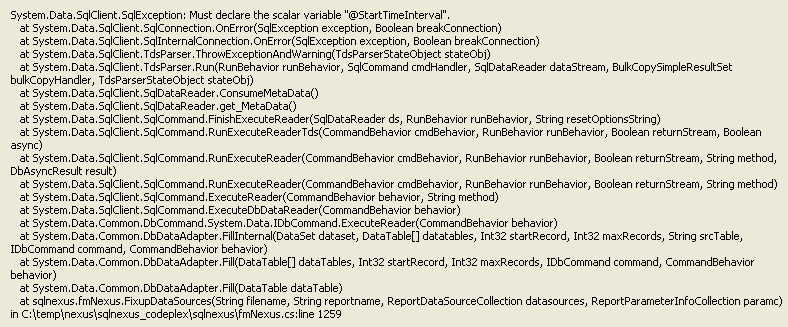
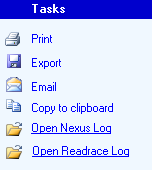 e Start Time and the End Time to be analyzed is picked up from the tblTimeIntervals. I was able to reproduce the issue on the same SQL Nexus database using one version of ReadTrace reports and not with the other. You can send an email to sstlbugs@microsoft.com and request the latest build for RML Utilities with the ReadTrace and SQL Nexus log file as attachments. The logs can be retrieved by clicking on the hyperlinks in SQL Nexus shown in the picture on the right.
 TroubleshootingSQL