Fluffy in an Availability Group Failover Scenario

Over the past month or so, I have been dealing with a lot of questions around the troubleshooting failover scenarios for Availability Groups. So I decided that it is now time for me to pen down a post on the data to be collected and analysis options for digging into the root cause for an Availability Group. I did have time on my hands and decided to induce a Hollywood element into this post as well. The availability group name that I would be using in this post is named as Fluffy. Fluffy has two secondary Availability Replicas: one synchronous and the other one an asynchronous replica.

As you can see in the screenshot below, I had initiated a failover for my Availability Group and the AlwaysOn
Extended Events sessions shows a state change. The Extended Events session writes to a target file (.xel) which is present in the SQL Server LOG folder.

The Extended Event session runs by default when an Availability Group is configured on the SQL Server instance. The following extended events are captured by the Event Session:

  • sqlserver.alwayson_ddl_executed,
  • sqlserver.availability_group_lease_expired,
  • sqlserver.availability_replica_automatic_failover_validation,
  • sqlserver.availability_replica_manager_state_change,
  • sqlserver.availability_replica_state_change,
  • sqlserver.error_reported

Note that the Extended Events session will only track the state changes for the local replica. The Extended Events session is NOT a global store for all the state change events for all replicas!

The previous set of logs that you collect from the SQL Server failover cluster instances like the SQL Errorlog, Cluster log and Windows Event logs are still applicable for root cause analysis for failovers. However, now you have additional logs in the SQL Server LOG folder which can assist with a root cause analysis for failover issues. The screenshot below shows two new files that would be of interest when analyzing SQL Server failovers namely, the AlwaysOn_health_* and <server name>_<instance name>_SQLDIAG_* logs. The first set of files are the AlwaysOn Extended Events logs and the second set of logs are called the Failover Cluster Instance Diagnostics Log.
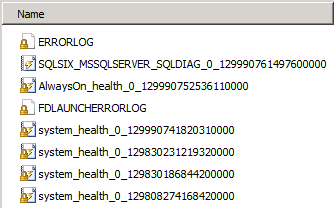
We already saw from the above screenshot what the AlwaysOn Extended Events health session can track. Now, let’s see what the Failover Cluster Instance Diagnostics Log collects. There will be multiple informational messages about the activities performed against the Availability Group. Additionally, there will be messages pertaining to the sp_server_diagnostics data (component_health_resultset) collection and the Availability Group state change (availability_group_state_change).

The T-SQL query below can help you fetch the state change information for your SQL Server instance. Again, this is specific to the instance from which you fetched the failover cluster instance diagnostics log:

select object_name,cast(event_data as xml) as xmldata
from sys.fn_xe_file_target_read_file('<file name/path>', null, null, null)
where object_name = 'availability_group_state_change'

A snippet of the XML data retrieved using the above query for the manual failover that I had done is shown below:

<data name=”target_state“>
<
value>2</value>
<text>Online</text>
</data>
<data name=”failure condition level“>
<value>3</value>
<text >SYSTEM_UNHEALTHY</text>
</data>


<data name=”availability_group_name”>
<value>FLUFFY</value>
</data>

</event>


In summary, the following sets of logs need to be collected from all the Availability Replicas:

  1. SQL Server Errorlog from the time of the failure
  2. Windows Application and System Event logs from the time of the failure
  3. All the Failover Cluster Instance Diagnostics log (upto a maximum of 10 rollover .xel files by default)
  4. All the AlwaysOn Extended Event session log files (upto a maximum of 4 rollover .xel files by default)
  5. System Health Session Extended Event session files (optional as the component health state information is present in #4)
  6. Windows Cluster log

There are some useful queries in the Books Online topic for the failover cluster instance diagnostics log to parsing through the collected data.

Happy troubleshooting!!

P.S. The above blog post was created using a lab environment provided by SQL Server Virtual Labs. This is an online environment which allows you to create virtual machines to practice various SQL Server scenarios. The lab that I used was “SQL Server 2012: AlwaysOn Availability Groups (SQL 142).

SQL PASS Summit 2012

Nov 6th -9th seemed like a whirlwind with the PASS Summit seeing a record number of registrations and probably a record number of first timers as well! The number of people thronging towards the Washington State Convention Center in the morning was a sight to see! The hotels around the convention center were over booked. If you were one of those individuals who booked late, then you either ended up paying steep prices or not getting your preferred rooms. The evenings of the event days saw most of the eating joints being thronged by the PASS attendees where the networking continue till late into the night!

Not only was this a fun event but I did manage to meet a number of folks (Tweeps) face-to-face that I interact with on Twitter or other technology forums. I did miss out on meeting a few folks that I wanted to but that would have to be now done at another time and place. I also got to meet other folks from the CSS (Bob Ward, Adam Saxton, Rohit Nayak and more) and SQL CAT teams with whom I interact with on a regular basis but hardly get to meet regularly due to the cross geographical locations.

The evening revelry also showed why Twitter is a powerful medium of communication. The venues were decided and broadcasted using the Twitter hashtag #sqlpass. Some of the post event parties had some highlights as well like the flash mob…. The karaoke sessions at the Hard Rock Café…. The Unicorn seemed to be having a ball!! (If you were there, you know what I am talking about).

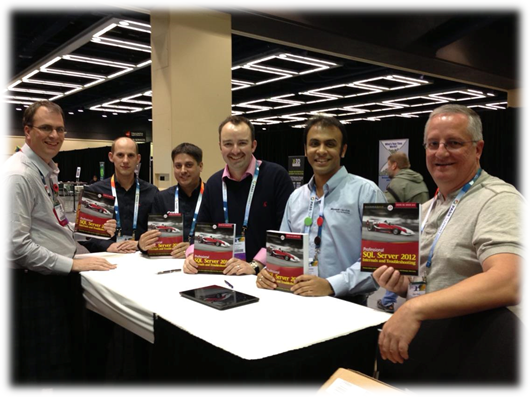
I had recently co-authored a book, Professional SQL Server 2012: Internals and Troubleshooting, which was launched at the event. There was a book signing session with the authors where we gave 30 books through a lucky draw. Thank you SQL Sentry for sponsoring this! Smile

image

I was also part of the SQL Server Clinic on all three days. I met with various customers who brought their design and troubleshooting related questions which spanned all areas of the product. We were staffed at the clinic with the engineers from all areas of expertise. So it was just a matter of walking up to the SQL Server Clinic, locating the expert and asking your question. I even looked at memory dumps at the Clinic! Smile Below is picture of one of the peak times at the clinic. The green shirts are the folks that were answering the questions!

image

#SQLFamily truly rocks! And this year’s #SQLPASS summit was #Awesome! – That is my Twitter update summarizing the event!

SQL PASS and Book Launch

Day 1 done at the SQL PASS Summit 2012!! …. It was a packed day with some interesting events starting with the Keynote session. I spent most of my day at the SQL Server Clinic meeting customers and discussing their work with SQL Server and helping them with suggestions and answers to the questions they had regarding the product. Most of all, I enjoyed meeting all the friends that I made on Twitter in person. It is always good to connect a face to a virtual name that you interact with.

Day 2 will be much more interesting as I will be part of the official launch of the book, Professional SQL Server 2012 Internals and Troubleshooting, that I have co-authored with Christian Bolton, James Rowland Jones, Glenn Berry, Justin Langford and Gavin Payne.

You will still find me at the SQL Server Clinic or have me loitering about near Exhibition Hall 4. In case you still can’t locate me, send a tweet across my way (@banerjeeamit). In partnership with SQL Sentry at the exhibitors stand from 12:30 on Thursday 8th November the authors will be available for a book signing event which will give you the chance to meet and greet the authors and contributors. This book is truly a great example of collaboration and community power where the authors have interacted over email for months but have met each other only once. And for some, this summit is their first face-to-face meeting!

SQL Sentry also have lots and lots of copies to give away for free so be sure to drop by their stand and ask about it! The book is also available at the PASS bookstore for sale. So if you want one, head out there and grab a copy.

You can also order it from your favorite online retailer:

Amazon.com: http://amzn.to/U9IlPV

Barnesandnoble.com: http://bitly.com/Ux1gog

Flipkart

SQL PASS Summit 2012

If you follow SQL Server related hashtags on Twitterverse, then you are already aware of the tweets that have been helping in the building of the SQL PASS Summit being held at Seattle from November 6-9. Rest assured that there will be a flurry of tweets originating from the Washington State Convention & Trade Center starting from Tuesday. And the reason for the excitement is coupled by the fact that I shall be present in person rather than following the event via Twitter or a streaming video session!

You might have already read the various blog posts doing the rounds on the net on why you should attend and what you can look forward to. I shall give you my 2 cents on why I think this is really worth a SQL Server professional’s time.

First and foremost, you will very rarely find the majority of the SQL Server brains in the world gathered under a single roof for a period of three days discussing and exchanging ideas about what you deal with everyday i.e. SQL Server. The session’s line-up will re-emphasize what I just said! Some of the best speakers in the industry will talk about various topics on SQL Server and you stand to gain a wealth of knowledge by just attending these sessions.

I have interacted with a lot of folks on Twitter regarding SQL Server related queries and it would be a great opportunity to connect faces to the Twitter handles that I am familiar with. Networking is one of the key components in SQL PASS and whether you want to or not, you will end up making acquaintances and even friends during the course of the three days (four if you are attending the Pre-Cons). Networking and interacting with the SQL Server community is the biggest motivation for me to attend PASS!

I always love to discuss SQL Server at any given opportunity and I will be available at the SQL Server Clinic on all three days. So feel free to walk up with your queries! Remember no question is a bad question! You don’t know till you don’t ask! You will get the opportunity to discuss your SQL Server related queries with some of the most experienced SQL Server engineers and members of the SQL CAT team)…. So feel free to walk by the clinic. The SQL Server Clinic timings are as follows:

•Wednesday

◦7:00am-8:00am (Early Birds)

◦10:00am – 6:15pm

•Thursday

◦7:00am-8:00am (Early Birds)

◦10:00am – 6:30pm

•Friday

◦7:00am – 2:00pm

We will be in 4C-3 which will be across from the Expo hall and on your way to the meal hall.

The Microsoft CSS team will also be delivering sessions at PASS. So don’t miss out on those. Bob Ward [B|T] will be delivering another session titled Inside SQL Server 2012 on November 7th: 1:30 pm – 4:30pm. Don’t miss that! For more details on what the CSS team will be upto at PASS, read the post by Adam Saxton [B|T] (yes, he is also delivering sessions).

Hope to see you there!

Psssstt… We shall try to get Bob’s Twitter followers to cross Adam’s… So start following Bob if you are not already doing so!!

Creating custom XEvent Templates

SQL Server 2012 added the Extended Events UI which made working with Extended Events session much easier. You no longer need to chalk up lengthy T-SQL scripts to spawn off your Extended Events monitoring session. The UI also provides you an option to view the collected data and perform groupings and aggregations for easier analysis.

The templates that you see while configuring an Extended Event session are located at “C:\Program Files (x86)\Microsoft SQL Server\110\Tools\Templates\sql\xevent“. When you export an Extended Events session, you will be given an option to export the Session as a Template to the following folder: “C:\Users\<user name>\Documents\SQL Server Management Studio\Templates\XEventTemplates“. The template is always exported as an XML file. Now when you create a new Extended Event Session, you will see the template under the user templates section in the templates view as shown in the screen shot below:

You can now choose to create as many templates as you want for your monitoring purposes. However, the template files have to be deposited in the above mentioned location so that Management Studio can show them to you while creating an Extended Events session.

The above blog post is a manifestation of a seemingly simple question asked by Naman Vadhera yesterday while he was exploring the Extended Events UI option.

Reference: http://msdn.microsoft.com/en-us/library/ms174169.aspx