PostgreSQL and MySQL are ubiquitous names in the world of open source relational databases. These databases engines have been widely embraced by developers in recent years. Microsoft’s Azure cloud is a first-class platform for open source technologies that allow you to bring the tools you love and skills you already have, and deploy any applications. We have continued to build on our love for open source and the goal to provide developers with choices by announcing Azure Database for PostgreSQL and MySQL during the Microsoft Build 2017 conference in Seattle earlier this year. Scott Guthrie had announced the preview for managed database service for PostgreSQL and MySQL. We recently announced preview availability of Azure Database for PostgreSQL and MySQL in our Azure India region.
You can read our preview service launch announcements here:
· Azure Database for PostgreSQL
· Azure Database for MySQL
Create your own Azure Database for PostgreSQL and MySQL on our India region. One of our design principles aimed at providing a similar experience for any customer using PostgreSQL and MySQL community engines while working on our Azure offerings. This makes it as easy as 1-2-3 for any developer to switch their PostgreSQL and MySQL databases to Azure.


What is Azure Database for PostgreSQL and MySQL?
We worked closely with our database service architects on building a database systems foundation that could scale across SQL Server, MySQL and PostgreSQL. We built Azure Database for MySQL and PostgreSQL on the solid foundation of the Azure SQL Database service fabric-based architecture and worked together to extend it giving all services more capabilities with regards to storage options and performance. This allow us to build a trusted, flexible and intelligent database hosting platform with a very elastic pricing model for our customers.
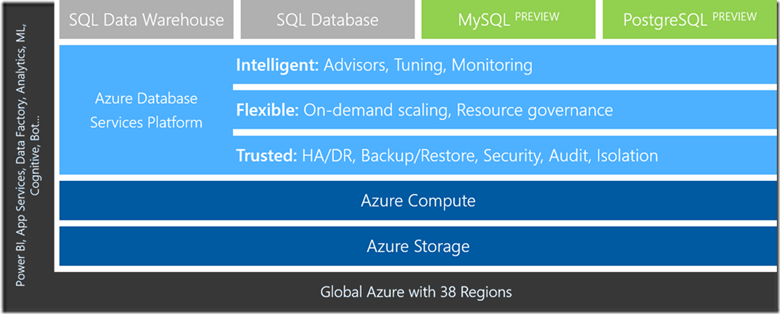
The above is a snippet from our Build presentation illustrating how Azure Database for PostgreSQL and MySQL is part of the overall Azure Database Services Platform where shared architecture yields benefits for each service that sits on top of it.
Azure Database for PostgreSQL is a managed database service that makes it easier to build apps without the management and administration burden. The service uses community edition of PostgreSQL and seamlessly works with native tools, drivers and libraries. At the start of preview, we are offering support for PostgreSQL versions 9.5 and 9.6.
Azure Database for MySQL is using the same MySQL Community Edition that is available from mysql.com which means you can use all the same tools you already use for development, management, performance profiling and monitoring.
Are you a developer using MySQL and PostgreSQL?
We have sample applications available on GitHub which allows you deploy our sample DayPlanner app using node.js or rubyonrails on your own Azure subscription. Day Planner App is a sample application that can be used to manage your day-to-day engagements. The app marks engagements, displays routes between them and showcases the distance and time required to reach the next engagement. This allows you the ability to evaluate the capability of our service using a sample application. If you have a sample application that would like to host on our repo or even have suggestions/feedback about our sample applications, please feel free to submit a pull request and become a contributor on our repo. We love working with our community to provide ready-to-go applications for the community at large.
Developers can accomplish seamless connectivity for our PostgreSQL and MySQL service using native tools that they are used to and continue to develop using Python, node.js, Java, PHP or any programming language of your choice. We support development with your favorite open source frameworks such as Djnago, Flask, etc., the service will work seamlessly.

The benefit of the Azure ecosystem
We provide deep integration between our other Azure offerings like Azure Web Apps, Monitoring, Security which allows you to benefit from the larger Azure ecosystem while using our managed PostgreSQL and MySQL offerings. An example of this if the Azure Database for MySQL’s integration with Azure Web Apps. Not only can you easily deploy an Azure Web App with Azure Database for MySQL as the database provider, but we’ve worked to provide complete solutions for common Content Management Systems (CMS) such as WordPress and Drupal. So now deploying a website is not only integrated and easy with a single provisioning process, but you have choice for a scalable database provider to handle your website traffic.
Over the next few months, you will continue to see many more such connected experiences and integrations to help you focus on application development and let Microsoft make the integration and administration easier.
What does our managed database offering provide?
Many managed database service offerings out there from different cloud providers promise to reduce database management complexity, but each one follows a different approach which forces customers to make several tradeoffs. We believe our approach to managed database services is unique in the industry and one that addresses the core pain points of an app developer and much more.
No mode administrative tasks – We address basic managed service capabilities such as automated patching, backup and restore capability, monitoring, alerting, logging. As you can see from the screenshot below, we allow you a management experience to restore older database backups which we take automatically for you. The differentiating factor for our service is that the user does not need to separately manage storage for backups. The service provides up to 35 days of retention for automated backups to be able to recover. This means, developers are now free from having to monitor, manage capacity and configure alerts on backup storage capacity. You will never have to worry about managing backups ever again! These backups are geo-redundantly backed up as well.

Built-in high availability – Azure Database for PostgreSQL and MySQL offers built-in high availability feature out-of-the-box. You got it right – no additional setup, configuration or extra costs! This means as a developer you do not have to setup additional VMs and configure replication to ensure high availability for your PostgreSQL database. All our databases will have an SLA of 99.99% during General Availability.
Security at your service – The service has security baked in. All data including backups are encrypted on disk by default. No additional switch or planning required to secure your database! Furthermore, the service has SSL enabled by default which makes all data in-transit encrypted. Optionally, if your client application does not support SSL connectivity, we created an option to disable it as well. We are committed to working broadly across the open source communities to ensure these security gaps are addressed over time.
Elasticity at will – Elasticity is one of the foundational attribute of the cloud. We understand that it is hard for any developer to figure out how much compute and storage is required at the time of deploying your app since no one can predict how popular the app will become and pre-plan for peaks and valleys? As an example, Azure Database for PostgreSQL allows you to scale compute on the fly without application downtime in one step. The following is a simple Azure CLI command that you will use to scale PostgreSQL database servers up or down.

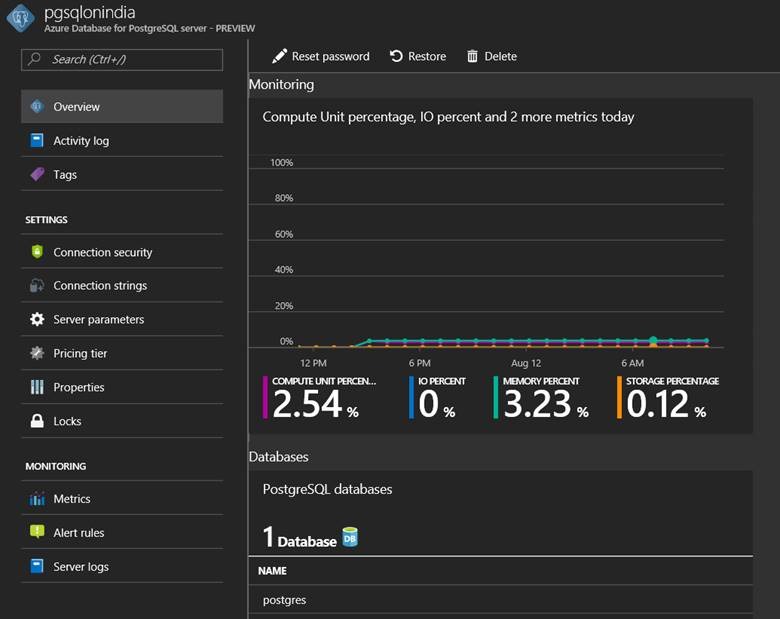
Monitoring, alerting and server logs – The service provides monitoring on metrics via integration with Azure Monitor service for up to 30 days, define alerting on those metrics, and configure server log retention period up to 7 days. In addition, users have the option to customize log verbosity parameter, so you can debug easily when developing and then tune it appropriately for production use. Further these metrics are integrated with many 3rd party tools. You get all of this for no additional costs!

Configurability and Extensibility – Azure Database for PostgreSQL allows you to configure database server parameters. This provides the flexibility to customize based on your application requirements. The service, at preview currently supports over 18 popular PostgreSQL extensions (including PostGIS) with a roadmap to enable more based on user feedback.
The road to General Availability
In our pursuit of focusing on the fundamental areas such as reliability, security, elasticity and worry-free database management, there are few areas where we have still lots of opportunity to improve! We have several identified opportunities to improve performance. This will be one of the areas of active focus for us in the coming weeks and months. Besides performance, we will continue to increase the scaling limits and support larger compute and storage sizes. It is also our intent to create tighter integration with other Azure data and app services to make developing rich and intelligent apps simple and as easy as hitting few clicks. We will be keenly awaiting user feedback and suggestions on where we can improve and/or add new value.
This is really an exciting new chapter for us and represents just a beginning. We hope you will join us in this journey too! Stay tuned for more blog posts in the future.
Call to Action
We would ask that you try the service today. Please leave your feedback and questions below. You can also engage with us directly through User Voice if you have suggestions on how we can further improve the service. You can also find sample apps and ARM templates in our GitHub repo.


 TroubleshootingSQL